A practical guide to creating learning slide shows: part 2 – the slides

Practical guidesIn the first part of this practical guide, we reviewed the capabilities of, and applications for, packaged slide presentations as a tool for learning. In this second installment, we look in more detail at the visual element in the presentation – the slides. Next time we’ll examine the best ways to go about recording a narration.

What your slides must achieve

If your slide show is going to be packaged with an audio narration, then your slides have very much the same function as they would do in a live presentation – they convey the visual element, while a voice delivers the words. In this context, slides are visual aids. With photographs, illustrations, diagrams and charts, they capture the viewer’s attention, clarify meaning and improve retention. With the sparing use of on-screen text, they can also help to reinforce key elements of the verbal content, but the prime purpose is always visual.
Without narration, your slides have to accomplish both roles – the visual and the verbal. In this respect they need a very different design focus to a live presentation. Take the following example of a slide taken from a live presentation that was converted to stand alone, without narration, on slideshare.net. A section of the slide has been allocated to a running textual commentary, essentially a much simplified version of the original presenter’s words:

Slides with ot without narration
When there is no narration, the slide must be amended to include the verbal information,

Not that this is the only way of displaying the verbal content. If, rather than converting a live presentation, you were designing a stand-alone and un-narrated slide show from scratch, you could use all sorts of devices to display the words, like the speech bubbles used in this example:

A slide with a thought bubble
There are many ways to incorporate the narrative into the slides.

Another consideration is the distance from which your slides will be viewed. In a live presentation, your audience is likely to be some way from the screen, whereas when the slides are used for self-study, they will be up close. Whether this matters depends on the device the audience will be using to view the presentation (this could be anything from a smart phone to a large PC monitor) and the size of the window in which your presentation will be displayed. You may be able to get away with displaying more detail than you would when live, but this needs testing.

An argument for imagery

Only an expert wordsmith can conjure up with words what a person, object or event actually looks like. Only an expert teacher can explain a concept or process clearly using words alone. And only a wonderful presenter can make a lasting impact on an audience without the use of imagery. As the saying goes, “a picture is worth ten thousand words”. Pictures show, quite effortlessly, what things really look like. They clarify concepts and processes. They stick in the memory. All you have to do is use them.

Charts make meaning from the numbers
Charts clarify numeric data that might otherwise be indigestible.

Pictures come in a variety of forms to suit different situations. Photographs portray what things look like; diagrams clarify concepts and processes; illustrations make the abstract more memorable. Presentation software such as PowerPoint makes it easy to employ pictures in all these forms. Your task is to avoid the lazy option – clip art – and to find the picture that really does tell a story.

Break the mould

It’s all too simple to use the standard templates provided by your presentation software, but these won’t always do justice to your images. Take these two examples:

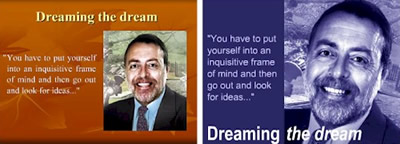
Break free from the templates
The title doesn't have to be centred at the top of the screen - it can be positioned to complement the image.

Avoid the standard templates
Again, with a little care you can break the mould. Here the image has been tinted blue.

You can definitely do without the slide junk – the logos, headers and footers that appear on every slide. There’s a place for your logo and that’s on the title slide (OK and maybe at the end as well). And you don’t really need all that clutter at the bottom of each slide – you’re producing slides, remember, not a report.
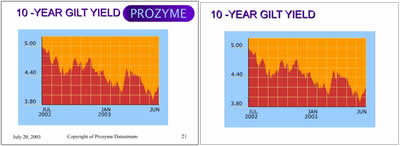
Remove the slide junk
Remove the slide junk - your corporate communications department doesn't always know best.

Text is also OK in moderation
You’ve probably heard of the expression “death by PowerPoint”. You’ve probably experienced it.

Death by PowerPoint
Admit it, you've been there ...

Yes, we’ve all been there, and yet we put up with it – see The Emperor’s New Slide Show.
Well, by far the biggest complaint you will hear from presentation audiences is that the slides contain too much text. In his book The Great Presentation Scandal, John Townsend relates how he counted the number of words and figures on every slide at a conference he was attending. The overall average was 76. That’s right, 76.
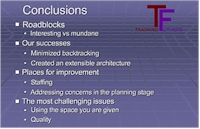
Too much text
If you've got two levels of bullets then you've no longer got a visual aid.

Given this, you may find it surprising that we could be recommending the use of text as a visual aid when the real problem is that there’s far too much of it. This is a fair point, but text can be useful as a visual aid, when you need to highlight the start of a new section, emphasise a key point, list a number of related points or present data in the form of a table.
If you do keep the amount of text on your slides to a minimum, it will have that much more impact when it does appear; particularly if you know when to use it and how to lay it out like the professionals. If you obey a few simple guidelines, that’s what you will achieve.

Use your slides to tell a story

A presentation is much more than a collection of independent thoughts accompanied by visual aids – however interesting the thoughts and however brilliant the visuals. Just like a novel, a radio play or a film, it has a beginning, an end and a carefully planned route in between.
Too many presentations look like they have been constructed by simply extracting slides from previous presentations. Although re-using slides is fine, if they are appropriate to the task in hand, this is never going to be enough to do the job. Like a film director, you have to look at the big picture, using words and images to manipulate your audience’s attention and their emotions. There is no black art to this; you just need a little imagination and a simple structure.
Coming next: the narration

Have the opportunities and constraints changed?

The new learning architectThroughout 2011 we will be publishing extracts from The New Learning Architect. We move on to the fourth part of chapter 2:
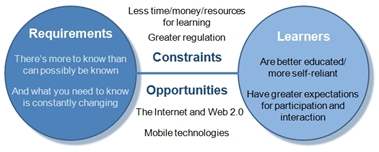
Let’s start with the constraints and there are plenty. For a start, organisations are demanding ever faster response from the l&d department. According to Bersin & Associates (2005), “a whopping 72% of all training challenges are time critical.” Some 38% of trainers surveyed in the USA by the eLearning Guild (2005) indicated that they were under significant pressure to develop e-learning more rapidly. A further 40% were under moderate pressure. The demand is felt most acutely for product training and technology training – subjects where timeliness is most critical and the content is most likely to change.
The pressure is also being felt because of increased regulatory demands. According to the Law Society of Scotland (2007): “UK employment law has moved far and fast since 1997. No other field of law has been the subject of such an ambitious, relentless and far-reaching legislative programme.” To meet legal requirements and reduce the risk of costly claims for compensation, compliance training is utilising a high proportion of training capacity.
And trainers will have to meet these demands with less budget. According to the CIPD’s 2009 Learning and Development Survey – which questioned 859 learning, training and development managers – annual spend per employee on training was down by about a quarter, from £300 to £220. Time will be as stretched as budgets, with flatter structures, less central bureaucracy and increased outsourcing.
Trainers aren’t the only ones short of time. According to an article in Business Week quoted by Jay Cross, “a third of all knowledge workers clock more than 50 hours a week, 43% get less than seven hours of sleep a night, 60% rush through meals, and 25% of executives report that their communications are unmanageable.” And in the SkillSoft survey4, “40% of those surveyed said they didn’t have time to do the training they needed.”
At the same time, there are some wonderful opportunities, not least because of the World Wide Web. As Kevin Kelly reported back in 2005, “In fewer than 4000 days we have encoded half a trillion versions of our collective story and put them in front of one billion people, or one-sixth of the world’s population. That remarkable achievement was not in anyone’s 10-year plan. Ten years ago, anyone silly enough to trumpet the above as a vision of the near future would have been confronted by the evidence: there wasn’t enough money in all the investment firms in the entire world to fund such a cornucopia. The success of the Web at this scale was impossible.” To help us take advantage of the Web, we are seeing a much improved technical infrastructure, with broadband connections increasingly available inside and outside of the firewall.
The rise in internet usage is topped only by the phenomenal growth in the use of mobile phones (there are currently some 4.5 billion users – one half of the world population) and other hand-held devices, such as games machines and portable MP3 players. As these devices continue to acquire increased power, functionality and bandwidth, the opportunities for l&d become self-evident.
References:

Informal Learning by Jay Cross, Pfeiffer, 2006.
The Future of Learning, SkillSoft, 2007.
Kevin Kelly in Wired Magazine, August 2005.
Coming next in chapter 2: A parade of bandwagons
Return to Chapter 1
Obtain your copy of The New Learning Architect

The Emperor's New Slide Show


Once upon a time there lived a vain Emperor whose only worry in life was to impress his subjects with the extraordinary quality of his business presentations. He developed new slide shows almost every day and loved to show them off to his people.
Word of the Emperor’s tremendous presentations spread over his kingdom and beyond. Two scoundrels, named Bill and Bob, who had heard of the Emperor’s vanity, decided to take advantage of it. They introduced themselves at the gates of the palace with a scheme in mind.

“We are two very good software designers and after many years of research we have invented an extraordinary method for the creation of visual aids that is so advanced and automated in its design that it almost completely eliminates the need for any serious creative effort on your part, thus allowing you to develop more presentations more quickly than ever before. As a matter of fact, we have streamlined this system to such an extent that most of your slides will look just like text to anyone who is too stupid and incompetent to appreciate their quality.”
The chief of the guards heard the scoundrels’ strange story and sent for the court chamberlain. The chamberlain notified the prime minister, who ran to the Emperor and disclosed the incredible news. The Emperor’s curiosity got the better of him and he decided to see the two scoundrels.
“Besides being almost entirely text, your Highness, these slides will have a uniformity of style and design that will make almost every slide look exactly the same, reinforcing your imperial branding. And there are other benefits too. Rather than having to rehearse your presentation, you will be able to read your notes right off the screen. And no more wasted hours developing handouts – simply print out your slides and all the words will be there.” The emperor gave the two men a bag of gold coins in exchange for a multi-site license to use the remarkable new software in all of the Emperor’s many residences and offices.

The Emperor set to work on his first presentation. Amazingly, just as Bill and Bob had promised, he was able to put together his slides in a matter of minutes. He called the Prime Minister in for a preview. “That’s strange, ” thought the PM. “All I can see is slide after slide of bullet points, presented in a mind-numbingly uniform imperial branding. Where are all the photos, the diagrams, the charts and the video clips that made the Emperor’s presentations so famous?”
But before querying this with the Emperor, he thought again: “If all I see is text, then that means I’m stupid! Or, worse, incompetent!” If the prime minister admitted that he could only see text, he would be discharged from his office.”

What a marvellous slide show, Emperor,” he lied. “So minimalist, so … so consistent.” Encouraged by this positive response, the Emperor set about using his new software to develop presentations at such a rate that soon almost all the government’s time was spent in attending them. No-one could criticise the monotonous nature of the Emperor’s slide shows without being accused of stupidity and risking their job. Exacerbating the situation, The Emperor ordered all his officials to develop presentations of their own to provide him with daily updates on matters of state.
One day, a schoolchild on a job placement scheme was invited to sit in on one of the Emperor’s presentations. Bored silly by the slides and aware that most of the audience was losing consciousness, he couldn’t help but remark to those around him: “These slides are just text. They’re not visual aids at all. In fact, this presentation’s a load of xxxx.”

“Fool!” his supervisor snapped. “Don’t talk nonsense!” He grabbed the child and took him away. But the boy’s remark, which had been heard by practically everyone except, luckily, the Emperor, who was too busy reading his script from the screen, was repeated over and over again until everyone cried: “He’s right, you know, it is just text. There are no real visuals and this presentation’s just a load of xxxx.”
And you know what? They were right.


The Emperor’s New Slide Show is extracted from the award-winning 2003 CD-ROM Ten Ways to Avoid Death by PowerPoint.  The wonderful pictures are from David Kori.

A practical guide to creating learning slide shows: part 1

Practical guidesIn a learning context, slides have traditionally been used as ‘speaker support’ – visual aids to support live presentations. However, slide shows produced using Microsoft’s PowerPoint or Apple’s Keynote also provide a useful way to deliver packaged content for self-directed learning. This practical guide explores the potential for packaged slide shows as a learning tool and describes the many ways in which these can be developed and deployed.

Slides as speaker support
Slides have traditionally been used primarily for speaker support

Media elements

A slide show can incorporate all major media elements. Although the dominant forms are always likely to be still images and text, presentation software also makes it possible to animate the text and images on slides, as well as to import audio and video.

Interactive capability

As we shall see, there are many ways of distributing slide shows. Many of these are essentially passive – you watch the slide show as you would a video. Although some formats – including native PowerPoint – have the potential for quite sophisticated interactivity, this is not the normal use of packaged slide shows and we will not be examining this application in any detail in this practical guide.
As passive media, the use of packaged slide shows is largely limited to the following learning strategies:
Exposition – required viewing as part of a set curriculum
Exploration – as developmental material for use by learners at their own discretion
Slide shows could also act as supporting material within other strategies – instruction and guided discovery – but only as one element in a blend.

Applications

While limited in terms of interactive capability, slide shows have a great many applications. Even without narration, they can provide a visually-dynamic and engaging way to present relatively small chunks of learning content. Where they are less suitable is in presenting large bodies of text. Text is much more satisfactorily handled on a web page or in a PDF, both of which more easily allow the reader to search and scan.

WIkipedia page
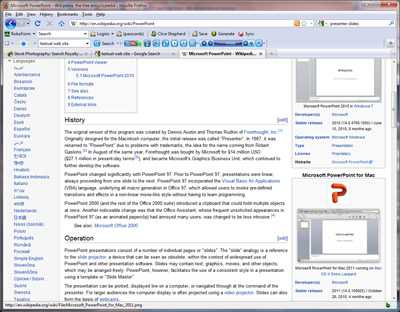
If you want to present lots of text, you're better off using a web page

When combined with an audio narration, slide shows take on many of the characteristics of video, allowing the learner to maintain visual focus on a sequence of images while these are explained in audio. Obviously if the intention is to depict actual events, in full motion, slides will not do as well as material captured with a video camera.

Formats

You have a wide range of distribution formats to choose from, each with its own distinct capabilities:

Animation? Interactivity? Narration? Easy distribution?
Native PowerPoint/Keynote Yes Yes Yes Yes if users have the application used to create
the presentation
PDF No No No Yes
Flash (using tools such as Articulate, Adobe Presenter or Snap! by Lectora) Yes Yes Yes Must be uploaded to an LMS/web server
Video Yes No Yes Yes but large files
SlideShare No No Only with special ‘Slidecasting’ facility Yes if users have Internet access.You can embed the
presentations in blogs and web pages

We’ll be examining these options in much more detail in future postings.
Coming next: creating the slides

Have learners changed?

The new learning architectThroughout 2011 we will be publishing extracts from The New Learning Architect. We move on to the third part of chapter 2:
What about our target audience, the learners themselves? Well, some changes are incontrovertible. First of all, the percentage of graduates in the workforce has risen enormously, as a result of the increased numbers of students now enrolled in tertiary education (UNESCO figures show a growth from 68m worldwide in 1991 to 132m in 2004). This is significant because graduates are more likely, as a result of their experiences in higher education where they have to be much more self-reliant, to have developed study skills, to be more independent as learners. Independent learners require less structure and less hand-holding. In some cases, you can just allow them to get on with it.
We clearly also have a more diverse workforce, with women taking up increasingly senior positions, and immigration and globalisation resulting in a melting pot of races, religions and nationalities. Coping with such a breadth of cultural expectations places a greater strain on less flexible training methods which depend for their success on homogeneity.
Over the last few years we have witnessed the dramatic effects of second generation web technology (sometimes called Web 2.0). Increasingly everyone is a teacher as well as a learner; nobody knows everything and everyone knows something. As Glen Reynolds writes:  “Until pretty recently, self-expression on any sizable scale was the limited province of the rich and powerful, or their clients. Only a few people could publish books, or write screenplays that might be filmed, or see their artwork or photographs widely circulated, or hear their music performed before a crowd. Now, pretty much anyone can do that. And now that more people can do that, more people are doing it, and it seems to make them happy.”
George Siemens endorses this view: “Mass media and education have been largely designed on a one-way flow model (structure imposed by hierarchy). Hierarchies, unlike networks and ecologies, do not permit rapid adaptation to trends outside of established structure. Structure is created by a select few and imposed on the many: The newspaper publishes, we consume. The teacher instructs, we learn. The news is broadcast, we listen. Now we are entering a two-way flow model, where original sources receive feedback from end-users, we need to adjust our models to fit the changed nature of what it means to know.” He goes on, “We are co-creators, not knowledge consumers. We are no longer willing to have others think for us.”
And computer games have had their effect too. According to William Winn, the new digital natives (those brought up with technology, as opposed to the ‘digital immigrants’, who’ve had to learn later in life) “think differently from the rest of us. They develop hypertext minds. They leap around. It’s as though their cognitive structures were parallel, not sequential.” As Mark Prensky  points out, “Traditional training and schooling just doesn’t engage them. It’s not that they can’t pay attention, they just choose not to. What today’s learners really crave is interactivity – the rest basically bores them to death.”
Yep, learners are changing.
References:

Knowing Knowledge by George Siemens, Lulu, 2006.
An Army of Davids by Glenn Reynolds, Nelson Current, 2006.
William D Winn quoted by Peter Moore in Inferential Focus Briefing, September 1997.
Digital game-based learning by Mark Prensky, McGraw-Hill, 2001.
Coming next in chapter 2: Have the opportunities and constraints changed?
Return to Chapter 1
Obtain your copy of The New Learning Architect

Have requirements changed?

The new learning architectThroughout 2011 we will be publishing extracts from The New Learning Architect. We move on to the second part of chapter 2:
A function of living and working in what is increasingly becoming, at least in the developed world, an information society, is that there is more to know than can possibly be taught. According to Richard Saul Worman , “a weekday edition of the New York Times contains more information than the average person was likely to come across in a lifetime in seventeenth century England.”
When the knowledge that employees need to do their jobs changes so rapidly, it becomes pointless to try and teach it all. As George Siemens  points out, “The connections that enable us to learn more are more important than our current state of knowing.  ‘Knowing where’ and ‘knowing who’ are more important today than knowing when and how.” Charles Jennings, formerly of Reuters, takes a similar view: “The word ‘knowledge worker’ in today’s world is a misnomer. Knowledge workers actually need to hold less knowledge in their heads to do their jobs than they did 20 years ago. However, they need to have the skills to be able to find the right information and knowledge, and build it into capability as efficiently as possible.”
According to Robert E Kelley , when employees were asked whether they believed that the retention of information in their heads was important for them to do their job well, in 1986 75% agreed, while in 1997 this had reduced to 15-20%. Kelley guessed that by 2006 the figure could be as low as 8-10%.
Even in the area of skills development, l&d departments are struggling to keep up. In a large-scale survey published in 2007 by SkillSoft , “almost two-thirds of employees said they had been asked to carry out tasks in areas where they felt insufficiently trained or where they were lacking the necessary skills. When asked if they could do a better job if they received more training, 65.9% said yes.”
I’d say that requirements are clearly changing.
References:
Information Anxiety by Richard Saul Worman, Doubleday, 1989.
Knowing Knowledge by George Siemens, self-published, 2006.
How to be a star at work by Robert Kelley, Three Rivers Press, 1999.
The Future of Learning, SkillSoft, 2007
Coming next in chapter 2: Have learners changed?
Return to Chapter 1
Obtain your copy of The New Learning Architect

A practical guide to creating learning podcasts: part 3 – editing and distributing your podcast

Practical guidesIn part 1 of this guide, we looked at what podcasts are and how they can be used. In part 2 we examined how you prepare for and then record your podcasts. In this final part, we look at what you can do to enhance your recording and prepare it for distribution.

Post-production

It could be that, when you listen to your podcast recording, it sounds great and you’re happy to release it as is. Perhaps you recorded it in a studio and the engineer has supplied you with a perfect master. Even if not, sometimes a ‘rough and ready’ approach is all that’s required and the priority is to get your podcast out as quickly as possible. However, a little care in editing could make your recording sound very much more professional, so it’s probably worth getting to know what is possible.

Audacity
Use a tool like Audacity to edit your audio

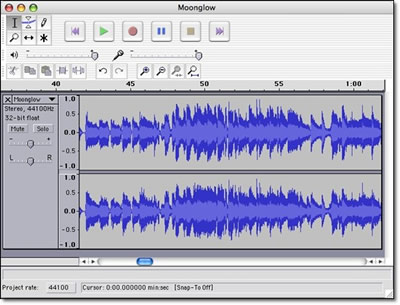
First priority is to delete unwanted ‘takes’, cut out any silences and remove any obvious mistakes. To do this, you’ll need some audio editing software. If you have access to professional quality software and know how to use it then great, but you’ll only need basic functionality and a simple editor like the free Audacity is all that you really require. Audio edits are achieved using simple cut, copy and paste functions, just like word processing, except here you’ll be editing an audio waveform rather than blocks of text. This is easier than it might sound, because the waveform indicates quite clearly where in the recording there is speech and where there is silence. If you’re finding it hard to locate exactly the point in the recording that you wish to edit, you can easily zoom in and enlarge the waveform.
You might like to consider editing in a short piece of music at the beginning and end of your podcast, just like you’d hear on a radio programme. If it’s not your own music, then you’ll either need to pay a royalty or use a clip from one of the royalty-free audio sites.
If the audio volume levels in your recording vary too widely, you can either select the offending pieces and raise or lower the volumes, or apply a ‘compression’ effect. Compression automatically reduces peaks and boosts low signals, so there is less difference between the loudest and softest pieces.
If your podcast is lengthy, i.e. more than ten minutes, you might consider chopping it up at this point into a number of shorter ‘episodes’. This will obviously involve you in some more file manipulation, but it will also reduce the size of each podcast file, thus speeding up download, as well as making it easier for listeners to access the content that they are most interested in.
Exporting to MP3
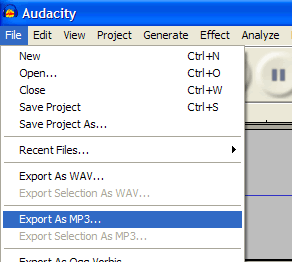
Export your finished podcast as an MP3 file

When you are completely happy with your recording, your next step is to convert your file to MP3 format for distribution. Assuming the main content of your file is the spoken word, you can safely export to MP3 at 64Kbps / 44.1Khz / mono. Don’t worry if you don’t understand these technicalities – you just need to choose the right option from the list! If you’re unhappy with the quality, try upping the bit rate to 128Kbps. You might want to use the stereo option if your podcast contains an interview or panel discussion, but only if you recorded it in stereo!

Distribution

So, your podcast is ready. Now all you need to do is make it as easy as possible for people to listen to it. You have plenty of options:

  • Send it round as an email attachment.
  • Attach it to a forum or blog posting.
  • Upload it to your learning management system or virtual learning environment.
  • Make it available on your web site or intranet.

Listeners could themselves, if they wish, import your podcast into iTunes and allow the software to copy the file over to their iPod for listening on the move. This involves you in no work, but is not the friendliest option, particularly if you are going to be releasing a series of podcasts. Much better to set up your podcasts so users can subscribe to the whole series. That way, each time you release a new podcast, iTunes will automatically download it and copy it to the user’s iPod at the next available opportunity. For this to work, your podcast needs to be made available with an RSS (Really Simple Syndication) feed. All blog posts work with RSS, so this is one way of setting up the feed – simply set up a new blog and attach each new podcast to a new post. Alternatively, use one of the many available podcast hosting services. Make sure you label your RSS feed with an appropriate title, author name and description – for more details, see Apple’s own guide to Making a Podcast.

iTunes
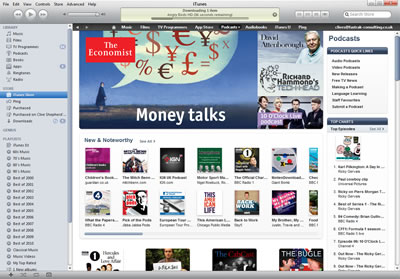
Your podcasts can be listed in the iTunes Podcast Directory

That concludes this podcasting guide, one of a whole series of how-to guides that we’ll be posting on the Onlignment blog this year. They will all be included (along with suitable pics!) in our Digital Learning Content: A Designer’s Guide e-book, due for release later in the year.
Happy podcasting!
Download this series of posts as a PDF

Time for a rethink

The new learning architectThroughout 2011 we will be publishing extracts from The New Learning Architect. We now move on to the first part of chapter 2:
Plus ça change, plus c’est la même chose
At the time of writing it is 2010. Around 32 years previously (a whopping 100000 years if you think in binary), I entered the learning and development profession. It wasn’t called learning and development then, of course, it was called training, but this appears to have been no more than a superficial re-branding.
In my first week as Finance Training Specialist, I attended a five-day residential classroom course at the seaside in Hove called Techniques of Instruction. It was run by an organisation called BACIE, now defunct. After a few preliminaries when we explored some of the pop-psychology theories about the way that people learn, we got straight down to the real action – learning how to instruct a group in a classroom setting, with the aid of a flip chart and, for the brave and more technologically-minded, some overhead projector transparencies. This course was sold on to a professional body when BACIE closed down and amazingly is still being run in almost exactly the same way today. True, it now lasts four days and PowerPoint has replaced the OHP, but essentially it’s the same.
As we shall confirm in a moment, the world as it affects the learning and development profession has changed dramatically in those 32 years. But in so many organisations (and I admit there are plenty of admirable and inspiring exceptions), training carries on regardless:

  • As a default option, formal training is conducted in the classroom, typically in substantial chunks (measured in days rather than hours).
  • Where the classroom is completely impractical or the subject matter of the training is less interesting to the classroom trainers, the remaining formal training is conducted in the form of interactive self-study lessons (mostly computer-assisted, but sometimes with the aid of videos or workbooks).
  • The rest (and that’s the major part) is entrusted to Nellie, who passes on her accumulated wisdom ‘on-the-job’.

Now it’s possible that this strategy (assuming, of course, that it has ever been consciously thought through) is as relevant now as it was all those years ago (assuming, again, that it ever was). Change for the sake of it benefits no-one. But even the most conservative l&d professionals would admit that it is at least worth checking to see. Has the situation changed sufficiently to warrant a rethink? Could we be doing better?
In 2006, in The Blended Learning Cookbook, I suggested a methodology for the design of blended learning solutions. The first stage in this methodology was a situation analysis, with three elements:

  • A definition of requirements, in terms of performance outcomes and learning objectives.
  • An analysis of the target audience – their preferences, prior knowledge, ability to learn independently, and so on.
  • A review of the practical constraints and opportunities – time, budget, skills, numbers, geographical dispersion, equipment, facilities, etc.

It occurs to me that these same three elements are as relevant when looking at the overall strategy as they are when designing a single intervention – after all, a learning and development strategy is the ultimate blended solution.
What has changed?
Coming next in chapter 2: Have requirements changed?
Return to Chapter 1
Obtain your copy of The New Learning Architect

What it means to be a professional

The new learning architectThroughout 2011 we will be publishing extracts from The New Learning Architect. Here is the fourth and final part of chapter 1.
To be a professional means a lot more than simply doing whatever the client wants. You wouldn’t hire an interior designer only to inform them that you’ve already chosen all the colour schemes and furnishings; you wouldn’t engage an accountant and then explain to them the way you wanted them to process your figures (unless of course you worked at Enron); you wouldn’t employ a fitness trainer and then tell them what to include in your workout; and you wouldn’t buy a dog and then insist on doing all the barking.
So why, then, do we continue to encounter situations in which line managers tell the guys from l&d exactly what they want in terms of learning interventions, with the expectation that they’ll simply take these instructions and run. “You’d like a six-hour e-learning package to train customer service staff to sell over the telephone? A two-day workshop to teach every detail of a new company system to all employees, regardless of whether or not they will be using it? A one-hour podcast to teach manual handling skills? No problem. That’s what we’re here for, to meet your requirements.”
Hang on a minute, you’re probably thinking. This isn’t an encounter between a professional and a client, it’s simply order taking.
When asked to jump, a professional does not ask “how high?” They say, “Let’s talk about this a little, because jumping may not be the best solution for you in this situation.” And if this tactic doesn’t work and the professional is told in no uncertain terms that jumping is the only acceptable option, then he or she has two choices: either they resign and get another job where their role as a professional is properly valued; or they agree to go ahead, but only after having expressed quite clearly in writing that jumping is against their best advice.
Learning and development isn’t common sense; it isn’t intuitive. If it was then experts wouldn’t lecture at novices for hours on end; they wouldn’t insist on passing on everything they know, however irrelevant, however incomprehensible. That’s why we have l&d professionals, so they can explain, in terms that the lay person can clearly understand, how people acquire knowledge and develop skills, and how best to support this process. If the customer doesn’t hear this advice, they will assume that the people in l&d are just the builders, not the architects; and, if no-one seems to be offering architectural services, they’ll take on the task for themselves.
Coming next: Chapter 2: Time for a rethink
Chapter 1, part 1: Architects for learning; part 2: Learning occurs in many contexts; part 3:  The learning architect is a professional
Obtain your copy of The New Learning Architect

A practical guide to creating learning podcasts: part 2 – preparing for and recording your podcast

Practical guidesIn part 1 of this guide, we looked at what podcasts are and how they can be used. In part 2 we move on to look at how you prepare for and then record your podcast.

Pre-production

A podcast needs a plan. Even if you are intending just to thrust a microphone in front of an unsuspecting interviewee, you need to know what questions you are going to ask and who would be best equipped to answer them. As I mentioned in the previous posting, radio is an excellent model here. The presenter of the programme would have researched the topic, got to know a little about their guests and prepared their questions. They would be mindful of how long each segment of the programme was intended to last.
Scripting:
As a general rule, a script is only needed for a monologue and monologues should only be used in moderation. Listeners tune out when the same voice goes on for too long, however interesting the speaker. On radio, they would only rarely hold on a single voice for more than a few minutes. But if a monologue really is what is required, think first about whether a script is absolutely essential.

Bored listener
Listeners will tune out if the same voice goes on for too long

Professional voiceover artists are very good at reading a script so it doesn’t sound like they’re reading a script. By and large, the rest of us aren’t. If you’re going to be doing the voice as well as preparing the script and you feel confident enough to work directly from your outline, then go for it. An alternative is to do a trial recording with you improvising from the outline, then convert this to a full script, ironing out the less successful elements. That way, you’ll end up with a tight script that sounds natural.
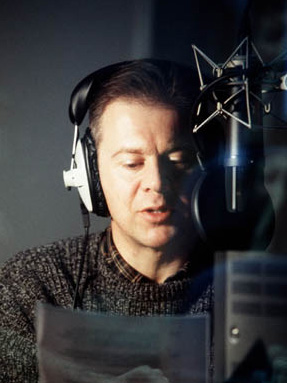
Voiceover artist
A professional voiceover artist can make reading from a script sound natural

When scripting, it’s hard to avoid slipping into report writing mode. Keep reminding yourself that the words you are writing will be read aloud, not from the screen. Try speaking the words yourself and keep revising until you can put them across effortlessly.
Whatever you do, avoid what Cathy Moore calls corporate drone. Write as you would speak. That means short sentences, simple language, active voice (“The cat ate the mouse” not “The mouse was eaten by the cat” ) and contractions (“I can’t remember …” not “I cannot remember …”). You can also help yourself by making absolutely clear (perhaps in bold type) which words need special emphasis.

Production

Professional recording:
When it comes to recording your podcast, nothing beats a recording studio. Here you will be able to record in perfect conditions, in a specially-prepared room without excessive reverberations or extraneous noise, with an engineer who handles all the technical stuff allowing you to concentrate on communicating, and with the right microphones and editing equipment to ensure a perfect recording. So, if you can, choose this option first. Studios are nowhere near as expensive as you might think and there are lots of them around. If you prepare well, so you can get on with the recording without delay, you probably only need to book for one or two hours.

Recording studio
You can't beat a professional recording studio for quality

At the end of the session, have the engineer provide you with all the digital files in their highest quality format , i.e. as they were recorded, ideally with all the obvious mistakes and pauses edited out. If you do ask the engineer to convert the files into their final, compressed format, then make sure you are also provided with copies of the originals, so you can easily make changes in the future.
Doing-it-yourself:
Of course it will not always be possible to use a professional recording studio, either because of budget or because you haven’t got time to get it all organised. If you’re going to do the recording yourself, then with a little care you can still obtain excellent results. Working with one microphone is always going to be easier. Of course if you’re recording a monologue, then that’s all you will need, but even with interviews you can still manage:

  • You can direct the mic at the interviewee to record all the answers to the questions, then record your questions again later. This will mean that you have to edit the questions in, which will require some cutting and pasting.
  • You can use a hand-held mic and direct it at whoever’s speaking at the time. This will work fine as long as you don’t talk across each other.
A radio interview
You can use a single hand-held mic to record interviews
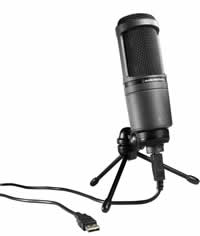
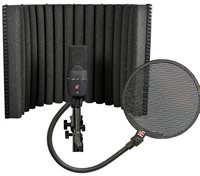
Although almost any microphone will deliver reasonable results when recording speech, it pays to use a decent one. Assuming you’re not wanting to hand hold the mic and you’re recording directly to a computer, then you should look at a USB condenser mic. There are now lots available and you shouldn’t have to pay over $100. It pays to add a pop shield, an inexpensive accessory that stops the signal level exploding whenever the letter ‘p’ is spoken (and yes, this does make a real difference). If you want to get recording studio quality, you might also purchase portable soundproofing materials for deadening the sound. See Soundproofing and acoustics for podcasters.

USB condenser mic
USB condenser mic

Soundproofing and pop shield
Portable soundproofing and pop shield

However good the microphone, you need to ensure a good quality signal. That means positioning the mic 4 or 5 inches away from whoever is speaking and setting the input level on your computer or recording device as high as you can without suffering ‘clipping’ (digital overload) when someone speaks loudly.
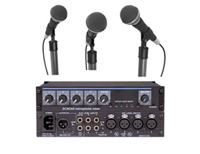
Mixer
If you record with multiple mics, you'll need a mixer

Multiple mics:
If you are running a panel discussion or want to conduct an interview without worrying about who’s got the mic and when, then you’ll need more than one mic. That makes things a little more complicated, because you’ll then need some sort of ‘mixer’ to sit between the mics and the computer or recording device. The mixer allows you to plug in multiple mics, balance the volumes, position the various inputs in the stereo mix and provide a single, combined signal for recording. If all this is too much for you, you probably are better off using a professional facility.
Coming next: Part 3 – editing and distributing your podcast
Download this series of posts as a PDF