Learning to learn better

The new learning architectThroughout 2011 we will be publishing extracts from The New Learning Architect. We move on to the fifth and final part of chapter 3:
According to Dror , “If learning is to take place, learners need to have the cognitive capacity to grasp the concepts and skills. However, no less important is the learner’s ability to know and be adept in higher cognitive functions, specifically to know what they know and what they do not know (metacognition), and to know how best to learn.”
Metacognitive skills are particularly important when you wish learners to be more independent in their learning, to take greater control over what they learn, when and how. They clearly cannot be effective in their independent learning if they don’t know what to focus their attention on. Metacognitive skills are hard to train, but that does not prevent trainers from helping learners to gain metacognitive insights, perhaps by some sort of diagnostic pre-test, simulation or similar exercise.
Study skills are easier to address. Experience and research shows that the following activities will greatly enhance the learner’s chances of success:

  • Note-taking: The best way to make sure that new information sticks is to write it up in your own words. There is good evidence to suggest that recall improves by 20-30% when you do take notes.
  • Visualisation: Many people find that it helps to create a mind map or some other form of diagram to help explain the relationships between the various concepts that they are studying.
  • Teaching it: Teaching what you have learned is a wonderful way to improve your own comprehension. The very process of working out how you are going to convey something clearly and simply to others will compel you to clarify your own understanding. Scott Young suggests a more topical way of achieving this: “If you really want to learn something, I’d suggest starting a blog and then just writing about the stuff you’ve learned. Whether you are studying courses or just trying to master a discipline, writing down what you know and trying to teach it to others will dramatically increase your own understanding.”
  • Using it: The familiar imperative to ‘use it or lose it’ is good advice. The more you practise, the better you get. As Clark, Nguyen and Sweller  explain: “Any task that is performed hundreds of times becomes established in long-term memory. Once automated, the skill can be performed with little or no resources from working memory. In effect, these skills are performed unconsciously.” You probably know the joke about the concert goer who asks the man in the street how to get to Carnegie Hall. The man replies with a single word, “Practise.”

References
Meta-cognition and Cognitive Strategy Instruction by Itiel Dror, a paper for Learning Light, 2007
Seven little known ways to dramatically improve your learning by Scott Young, a guest blogger at Ririan Project
Efficiency in Learning by Ruth Clark, Frank Nguyen and John Sweller, Pfeiffer, 2006
Coming next: Chapter 4 – A contextual model for learning
Return to Chapter 1
Return to Chapter 2
Obtain your copy of The New Learning Architect
 

A practical guide to creating learning screencasts: part 2 – creating all-in-one-take screencasts

Practical guides
In part 1 of this guide, we looked at the arguments for screencasting and the two main types of tools – online, all-in-one-take and fully-featured desktop applications. In part 2 we take a look at the former.

Choose a tool

There are plenty of free online screencasting tool – you’ll find plenty listed in Jane Hart’s Directory of Learning Tools. To get your search started, you could do worse than take a look at screenr, screenjelly and screencast-o-matic.

Why use an online tool?

Here are some arguments for going the online route:

  • If they’re not free, then they’re certainly inexpensive.
  • You don’t have to download an install yet another desktop application.
  • They come with all sorts of nifty connections to other online tools, particularly social media.
  • The tools come with very basic functionality, so you’ll be up-and-running in minutes and won’t spend ages tinkering.

As you probably guessed, there are some drawbacks:

  • There may be some security issues having your organisation’s applications and sites shared online.
  • You need good internet connectivity.
  • Because you only get the one take and can’t edit your work or add extra functionality, you may not be able to achieve all you want.
  • If the vendor goes bust, bang goes your content (assuming you haven’t downloaded copies).

Choose your topic

All-in-one-take screencasts make great resources for just-in-time use or as elements in a blended offering. They need to be short (under 5 minutes) and highly practical. Don’t just work through all the functions in your application or on your site, regardless of whether anyone’s interested – describe how to do something really useful and not obvious. Everyone loves practical tools and tips.

Prepare

You’ll want to think through carefully what you want to show and how. If necessary, practise a few times until you feel confident that you can perform the task fluently. In most cases best advice would be not to script – the best screencasts are simple and conversational in tone. If you really must script, then edit the words carefully to make sure they sound completely natural.

The instructions won't take long to read!

Setting up

Typically you will be asked to select the area of the screen that you want to capture or to pick one of a range of standard sizes. Remember that the screencast is likely to be viewed at less than the original size, perhaps much less if on a smart phone, so focus in on what’s really relevant. A few tests should help you to find the most appropriate arrangement.
If you have more than one microphone on your system, then you’ll have to specify which one you want to use. As with all audio, quality does count – if you have a quality mic (ideally with a pop shield) then use it. If not, use what you have, but try to ensure there’s not a lot of background noise.

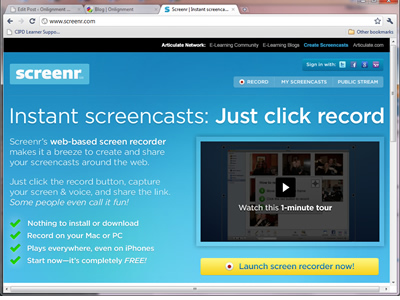
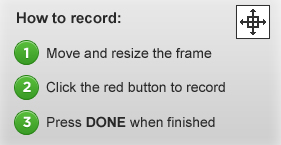
The screenr toolbar is typical of all these tools. You can set the capture dimensions, choose your mic and then start, pause and stop the recording.

Record

First, briefly introduce yourself and explain what it is you will be showing and why viewers will find this useful. Then commence your live performance (no pressure then), pausing where necessary. If you make minor stumbles, don’t stop, because chances are no-one will notice or care. Obviously if you make a complete hash, there’s no problem in starting again.

Sharing

Screenr allows you to share your screencast in a number of ways or download to use locally

Depending on the tool, you’re likely to have plenty of ways to share your screencast:

  • Provide a link in an email, tweet, blog post or forum post or on your intranet, web site or LMS. The user will be taken to the vendor’s website to see the screencast.
  • Alternatively play the screencast directly in a web or forum posting or  on a web page by embedding the HTML code supplied by the vendor.
  • Download the screencast as a video. You can then upload it to your website, intranet or LMS, or send it out as an email attachment.
  • Publish the video on YouTube.

Coming in part 3: Using more sophisticated desktop tools.

Helping others to learn

The new learning architectThroughout 2011 we will be publishing extracts from The New Learning Architect. We move on to the fourth part of chapter 3:
As someone who has chosen to read this book, you presumably have more than a passing interest in helping the learning process on a little, whether directly, by training or creating instructional materials, or by introducing policies that will help learners and their managers to be more effective in their own efforts. So let’s take a break from looking at the process of learning to examine those practices that are likely to provide learners with the most effective support.
First of all, it is worth clarifying once and for all, that learners are not empty vessels into which you can pour whatever knowledge you would like them to have. As we have seen, learners are in the driving seat, not you. They determine what it is to which they pay attention; they decide whether or not to make the effort to transfer what they have learned into long-term memory; it is their mental models into which the new knowledge will be integrated, not yours. There is a massive difference between what is taught and what is learned. As Theodore Roszak explains, “Information is not knowledge. You can mass-produce raw data and incredible quantities of facts and figures. You cannot mass-produce knowledge, which is created by individual minds, drawing on individual experience, separating the significant from the irrelevant, making value judgements.”
Before you even consider delivering new information, the learner must be in the right emotional state, as Daniel Goleman reminds us: “Students who are anxious, angry or depressed don’t learn. People who are caught in these states do not take in information effectively or deal with it well.”
And with the negative emotions removed, it is just as important to work on the positive, as Berman and Brown emphasise: “It is emotion, not logic, that drives our attention, meaning-making and memory. This implies the importance of eliciting curiosity, suspense, humour, excitement, joy and laughter.”
Norman also sees the value of excitement in learning: “The most powerful learning takes place when well-motivated students get excited by a topic and then struggle with the concepts, learning how to apply them to issues they care about. Yes, struggle: learning is an active, dynamic process and struggle is a part of it. But when students care about something the struggle is enjoyable.”
He goes on: “Students learn best when motivated, when they care. They need to be emotionally involved, to be drawn to the excitement of the topic. This is why examples, diagrams, illustrations, videos and animations are so powerful. Learning need not be a dull and dreary exercise, not even learning about what are normally considered dull and dreary topics.” And how can these topics be made exciting? Well, nothing works better than by making them relevant to the lives of each and every individual student.
Even the best motivated learner is restricted by the rate at which the brain can cope with new information. Fortunately there is a great deal you can do to minimise the learner’s cognitive load, the burden on their working memory. At a relatively simplistic level you can cut back on the amount of information that learners are exposed to and are expected to acquire at any one time. More often than not, trainers and instructional designers dramatically overestimate the amount of new material that their learners will be able to assimilate. They would do better to break the content down into manageable chunks, remove all unnecessary or redundant material and focus the learner’s attention on the most critical material. Further progress can be made by taking advantage of the ability of working memory to process both visual and auditory information separately, utilising the benefits of self-paced learning, using diagrams to aid understanding, and supplying the learner with materials that they can refer to on-the-job.
Trainers and designers can also help the learner to retain what they learn, to transfer new knowledge to long-term memory. Without this help, there is a danger that much of the new information will be forgotten within hours. Dror encourages setting learners more challenging tasks: “As depth of processing increases, the material will be better remembered. As the learners interact with the material in more cognitively meaningful ways, as they consolidate it with other information in their memory, they are going to remember it better. Rather than using repetition, have the learners make judgements about the material. As the judgements are more complex, depth of processing will increase.”
As mentioned previously, transfer to memory is not enough; the knowledge also needs to be easily retrievable when the need arises. The best way to facilitate retrieval is to fashion practical exercises so they mirror the way that tasks will be carried out on-the-job. Another tactic is to provide knowledge retrieval exercises at intervals throughout the learning process. Practice, supported by specific and immediate feedback, that is managed in this way has many advantages over practice that is massed, not least because learners get the chance to detect and correct any mistakes or misunderstandings at the earliest opportunity.
It is worth reminding ourselves at this point, that the focus of this book is on learning at work, not the process of early development and education. As Bill Sawyer explains, there is a difference: “Well before our consciousness develops into a sense of ‘I’, we are learning machines. We depend upon it for our survival as both individuals and as a species. But learning grows with us. Initially, learning is virtually an automatic process. Before long it begins to take on more and more characteristics of choice. There is still learning by chance or environment, but we begin to take more control over our learning.”
Eventually, the principles of adult learning as defined by Malcolm Knowles come into full effect. As a person matures:

  • their self-concept moves from being a dependent personality to a self-directed one;
  • their growing experience becomes an important resource for learning;
  • their time perspective shifts from one of postponed application of knowledge to the immediacy of the task at hand;
  • their motivation to learn comes from within.

Also, as adults we have a significant, long-term investment in the way we are now. Learning is a change and change is a threat to the status quo, to the time, energy and other resources you have expended to become what you are. Resisting change does not make you a Luddite or a ‘difficult person’. Everybody resists some changes and this is only right and proper, because not all change is necessary or beneficial. We would be weak-minded if we simply adopted every suggestion and acted on every order, however senseless.
People don’t actually resist change, in fact we voluntarily and enthusiastically engage in all sorts of massive and highly risky changes throughout our lives. Changes like getting married, having kids, moving from one town or country to another, even changing careers. Clearly these are not trivial changes. It seems that what people actually resist is being changed, that is change that they haven’t instigated for themselves.
Learning changes the brain, for good. If it doesn’t, then it hasn’t happened. The learner is the gatekeeper to their brain and no amount of lecturing, instructing, prescribed reading or showing of videos will make any difference if the learner is not convinced that they want their brains changed. For the gates to be opened, the learner has to recognise that they have a gap in their knowledge or skills that they believe is worth filling. And they will be much more committed to the process – and the learning will be much deeper – if they have discovered the learning for themselves. The humanist psychologist Carl Rogers once said that “nothing worth learning can be taught”, which is probably going a bit far, but there’s little doubt that learning by doing, conversation, reflection, discovery and inductive (non-directive) questioning will be more effective than simply telling.
References
The Cult of Information by Theodore Roszak, University of California Press, 1994
Emotional Intelligence by Daniel Goleman, Bantam Books, 1995
The Power of Metaphor by Michael Berman and David Brown, Crown House Publishing, 2000
Shall I remember? by Itiel Dror, a paper for Learning Light, 2006
The New Hierarchy by Bill Sawyer, a posting to The Learning Circuits Blog, May 2007
The Adult Learner by Malcolm Knowles, Butterworth-Heinemann, 1973
Coming next in chapter 3: Learning to learn better
Return to Chapter 1
Return to Chapter 2
Obtain your copy of The New Learning Architect

Taking a look beneath the hood

The new learning architectThroughout 2011 we will be publishing extracts from The New Learning Architect. We move on to the third part of chapter 3:
To quote Frank Felberbaum: “Each adult brain is endowed with approximately 100 billion neurons (nerve cells) – half of all the nerve cells in the body – but that’s just the starting point. From the moment we commence thinking, remembering, observing and learning, we are literally recreating our brains. Scientists have estimated that each of us has the capacity to make up to 10 trillion connections among our neurons, although most of us take advantage of only a small portion of this capacity. Each time we make a new connection we actually make ourselves smarter, not just because we know more, but because our brain actually works better.”

The brain
The brain – that’s my second most favourite organ! Woody Allen

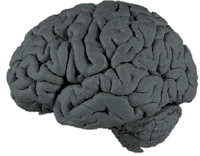
It’s time for a quick tour of the brain. Rising from the top of the spinal column is the brain stem, the oldest part of your brain, sometimes called the ‘reptilian brain’. The brain stem ‘remembers’ how to carry out the most basic functions necessary to keep us alive, regulating our breathing, heartbeat, sleep and waking.
Sitting on top of the brain stem is the limbic system, also known as the ‘old mammalian brain’. Here is where our emotions reside – all those survival-oriented feelings we need to keep the species going and to recognise danger and safety (although we may also have developed more sophisticated uses for our emotions). Here, too is the part of the brain that interprets sensory data, enabling us to respond quickly to danger.
The most uniquely human portions of our brain are the cerebellum and the cerebrum. When you’ve learned to do something so well that it becomes automatic – such as driving a car, riding a bike, typing or operating a computer – that memory, known as procedural memory (or sometimes ‘muscle memory’) is stored in your cerebellum, which sits just behind your brain stem.
The cerebrum consists of about two-thirds of our brain, which is where our personal memories are stored. The cerebrum is divided into two hemispheres, popularly known as the ‘left brain’ and the ‘right brain’. Although brain function is more fluid than these terms suggest, we can say generally that the left side of the brain handles logical thought, analysis, numbers and words, while the right side recognises patterns, perceives spatial relations and tends to think in images and symbols. Connecting the two hemispheres is the corpus callosum, which enables us to integrate these two modes of thinking. Research by Levy   at the University of Chicago confirms that both sides of the brain are involved in nearly every human activity.
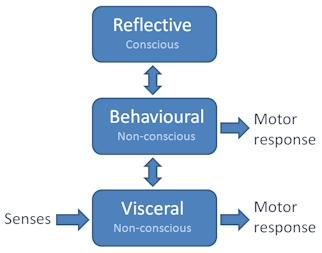
Thinking back to the three levels of brain function as described by Norman and colleagues, we can see that the visceral level can be localised to the limbic system, the behavioural level with the cerebellum and the reflective level with the two hemispheres of the cerebrum.
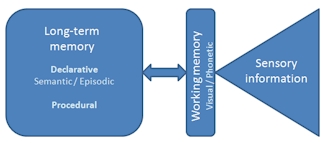
Felberbaum  describes memory as “an active, dynamic process in which old and new information, associations and complex electrical circuitry all work together to synthesise everything we know into new responses.” Memory comes in a variety of forms. We’ve already heard about procedural memory, which records ‘how’ we do things. On the other hand, declarative memory (so-called because it can be articulated into words, i.e. it is conscious) is what we know about the world. It’s what we have learned as a result of simply living our lives or from more formal education and training.
Memory
Declarative memory can be divided into two sub-categories: semantic memory, which stores meanings, understandings, factual knowledge, concepts and vocabulary; and episodic memory, which stores information about particular episodes or events, including the time, place and associated emotions. Episodic memory and semantic memory are related. For example, semantic memory will tell you what a horse looks and sounds like. All episodic memories concerning horses will reference this single semantic representation of a horse and, likewise, all new experiences with horses will modify your single semantic representation of a horse.
Both declarative and procedural memories are long-term, but quite a bit of work has to be done for these memories to be formed in the first place. The brain is bombarded with sensory information but can actively pay attention to only a very small amount. This information is transferred to ‘short-term memory’, which allows a person to recall information for anything from several seconds to as long as a minute without rehearsal. Its capacity is also very limited: George A. Miller , when working at Bell Laboratories, conducted experiments showing that the store of short term memory was 7±2 items. More recent estimates show this capacity to be rather lower, typically in the order of 4-5 items. The limitations of short-term memory are significant because they explain how easy it is to overload a learner. The management of cognitive load is one of the most important responsibilities of the teacher or trainer.
Baddeley and Hitch, at the University of York, proposed a model of working memory, which seeks to explain how we integrate short-term memory with what we already know. Their model contains a ‘central executive’ working with two ‘slave systems’, one dealing with images and patterns, and the other sounds. Their work has helped to explain how it is that teachers can maximise their students’ capacity to learn by combining visual imagery with the spoken voice.
For learning to take place, new information entering working memory must be integrated into pre-existing mental models or ‘schemas’ in long-term memory. For this to happen, those schemas must also be transferred into working memory. As a result of rehearsal and elaboration, the incoming content is transformed to result in expanded schemas stored in long-term memory.
At this point, learning has almost taken place. The process is only concluded when the new schemas are brought back into working memory when needed to complete a task. Those schemas that incorporate cues that reflect the context in which the task has got to be performed are the most likely to be easily retrieved.
If this all sounds a bit complex and rather unnecessary, then don’t despair. Based on this knowledge of the brain and the research which this has spawned, cognitive scientists have been able to come up with a whole raft of practical guidelines for l&d professionals, guidelines that can be trusted and acted upon, allowing us to escape from the clutches of the quacks, the pop psychologists.
References
The Business of Memory by Frank Felberbaum, Rodale, 2005
Right brain, left brain: fact or fiction by Jerry Levy, Psychology Today, May 1985
The magical number seven, plus or minus two by George A Miller, in Psychological Review, 63, 1956
Coming next in chapter 3: Helping others to learn
Return to Chapter 1
Return to Chapter 2
Obtain your copy of The New Learning Architect

 

A practical guide to creating learning screencasts: part 1

Practical guidesA screencast is a demonstration of a task carried out in a software application or on a web site for use as a learning aid or for reference.
To create a screencast, you simply carry out all the operations involved in completing the task and the software records this as an animation. This animation can be annotated with text labels, accompanied by an audio narration or both. Some authoring tools allow you to go beyond offering simple demonstrations, to provide the learner with opportunities to try out the tasks for themselves using a simulation of the original software.
This 3-part practical guide explores the potential for screencasting, describes the different types of tools available and provides some tips on how to make a good job of your own screencasts.

Media elements

A screencast contains one essential visual element – an animated software demonstration – supplemented by a verbal explanation, presented either as a series of pop-up text labels, an audio narration or as a combination of the two. Typically screencasts are presented as short, self-contained modules or in short sections, to make it easy for the learner to access the material in small chunks and often to practise as they go.

Interactive capability

Many screencasts are passive, presented as short videos which the learner can review quickly and then try out for real. Others incorporate simulations of software tasks which allow the learner to practise without having to leave the screencast and use the real application.
In their passive form, the most likely strategy for the use of screencasts is exploration, as material for use by learners at their own discretion, typically for reference. When simulated tasks are incorporated into the screencasts or when screencasts are combined with other activities that allow the learner to practise what they have learned, they can also play a key role in an instructional strategy.

Applications

Screencasts have two very obvious applications: they can be used as part of a formal training programme to introduce a new or revised software application or web site, or as reference material for people who are already users.

Screencasting tools

Some screencasting tools have been around for many years, long before the term ‘screencasting’ had been coined. These tools, like Techsmith Camtasia and Adobe Captivate, are desktop applications with sophisticated functionality. Over the years, their capabilities have been increased to support many forms of digital learning content, not just screencasts. These tools allow many ways for the learner to interact with the screencast and to undertake assessments. They also allow the author much greater control over the way in which the screencast is displayed.

Camtasia
Desktop tools such as Camtasia provide much of the functionality of a video editor and an elearning authoring tool

Other, much more recent tools, such as screenr and screenjelly, operate ‘in the cloud’. They allow you to create simple software demonstrations ‘all in one take’ and then to publish these online. In the next part of this guide we’ll be taking a much closer look at these online tools.
screenr
Simple online tools such as screenr allow you to produce screencasts in one take

Coming next: creating all-in-one-take screencasts
Thanks to Craig Taylor for inspiring this guide with his session at the eLearning Network event on April 8th.

A little reflection does us good

The new learning architectThroughout 2011 we will be publishing extracts from The New Learning Architect. We move on to the second part of chapter 3:
We go to work to do things, not to learn. Depending on how we earn our living, what this doing actually entails may be little more than repeatedly drawing upon our repertoire of learned behaviours – we’re literally on auto-pilot. More commonly, we’re also having to work at the reflective level, to analyse problems, come up with solutions, communicate with others and make decisions. Now in the process of doing all this, our behaviours will inevitably adapt and evolve to some extent with no conscious effort on our part – we learn through simple trial and error, and by our observations of the successes and failures of others. But this is a haphazard and uncontrolled way to proceed if you value your job and your career – there’s a definite risk that, regardless of the number of years that you clock up, you’ll have the same year’s experience over and over again.
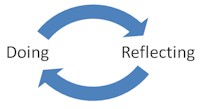
So, at very least, we need our learning model to extend beyond doing:
Doing and reflecting
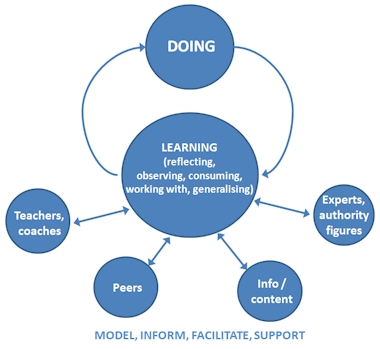
Left to our own devices we can do quite well, thank you. But imagine how much richer our learning could become if we were able to draw upon the resources of others, who have attempted the same tasks in the past. As we look further afield for assistance, our learning model becomes correspondingly more complex:
Model, inform, facilitate, support

  • As we develop our network to include experts and peers, and gain access to prepared content, such as reference materials, we have the basis for just-in-time learning – learning at the point of need.
  • As we extend our network to include coaches, mentors, on-job instructors and professional colleagues, and as we gain access to all manner of learning materials, we can start to get ahead of the game, to develop our knowledge and skills to meet future challenges.
  • And as we build further relationships with teachers, trainers, facilitators and co-learners, we have the opportunity to formalise our learning outcomes through educational and training courses.

The people and content with whom we interact perform many useful functions:

  • They model effective behaviour.
  • They inform us of the facts, concepts, rules, principles, procedures and processes that underpin effective behaviour.
  • They facilitate our learning by encouraging us to participate in thought-provoking and challenging activities, by introducing us to useful resources, and perhaps most importantly, by asking the right questions.
  • They support and encourage us by establishing the right emotional conditions for learning and helping us out when we’re in difficulty.

Which leaves us to observe, to reflect, to consume all that content which we find for ourselves or which we are pointed towards, to work with new ideas, and to generalise about what we should do in the future. Now we’re motoring.
Coming next in chapter 3: Taking a look beneath the hood
Return to Chapter 1
Return to Chapter 2
Obtain your copy of The New Learning Architect
 

A practical guide to creating learning slide shows: part 4 – distribution

Practical guidesIn the first part of this practical guide, we discussed the potential of stand-alone slide presentations as a tool for learning. We moved on to look at the visual element in the presentation – the slides – and the auditory component – the narration. In this final section, we explore what’s involved in getting your slide show out there in front of as many eyeballs as possible.

Keeping it simple

Your first option is to send round your presentation in its native PowerPoint format or to make this available for download. This will work as long as everyone who is likely to want to view the slides has their own copy of PowerPoint and are able to view the slides in the format in which you have saved them (for example, to view presentations saved in the pptx format, viewers must have PowerPoint 2007 or later). Presentations saved in native PowerPoint format will be bulky but they can still be edited by the recipient (if you regard that as an advantage).

Saving from PowerPoint
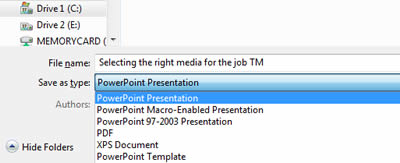
PowerPoint allows you to save in a number of backwards-compatible formats but also as PDF files

A simple alternative is to save your slides directly from PowerPoint into PDF format. This reduces compatibility problems as most people have a PDF reader. It will also reduce file size. However, the files will no longer be editable.

Converting to Flash

You can achieve a more polished and web-friendly result using one of a number of tools that will convert your presentation into Flash format, along with a host of useful additional features. Perhaps the best-known of these tools are Articulate Presenter and Adobe Presenter (although you might also take a look at the newly-released and budget priced Snap! by Lectora). These work similarly in that they sit within PowerPoint itself as an add-in, with their own ribbons or drop-down menus (depending on the version of PowerPoint).

Articulate ribbon
The functions of Articulate Presenter are available as a ribbon in PowerPoint 2007 and 2010

Using these tools you can add narration, organise your slides into sections and sub-sections, insert additional media such as Flash animations and videos, and then publish into Flash for upload to your intranet, learning management system or other web site. Actually these tools can do a lot more in terms of adding interactivity, but that goes beyond the scope of this practical guide.
Articulate Presenter output
This presentation has been converted to Flash for delivery online

Exporting to video

If you just want your slides to be viewed in a linear fashion, from start to finish, and you are prepared to add an audio narration, then you should seriously consider distributing in video format. One attraction is the ease with which you can upload video to sites such as YouTube. Another is the fact that nearly all mobile devices will support video, whereas Flash can be a problem, particularly on Apple devices.
You need a tool which will capture your slides, allow you to add narration and then publish to a suitable video format. If you are happy to go with the Windows Media Video (WMV) format, then you can do this directly from the latest version of PowerPoint. If you want  a bigger choice of formats and more editing flexibility, try using a tool like Camtasia.

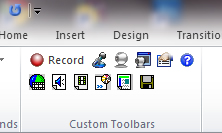
Camtasia toolbar
Camtasia can also be installed as a PowerPoint add-in, allowing you to access the Camtasia controls direct from the ribbon

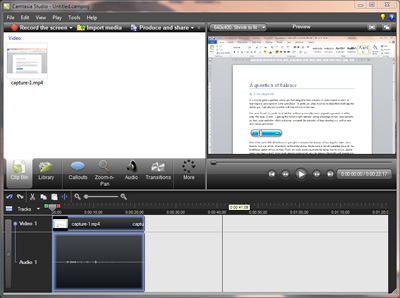
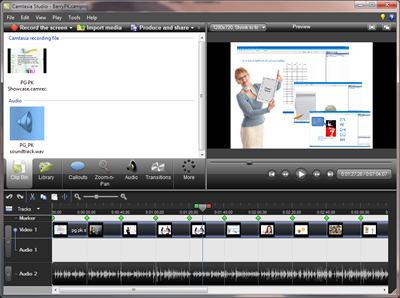
Once you have captured your slides (including any embedded animations and videos), the Camtasia Studio software allows you to make edits and export to a wide range of video formats.
Camtasia Studio
Camtasia Studio

Publish on SlideShare.net

Another option to consider, if you want your presentations to have the widest possible online presence, is to publish to a site like SlideShare.net. What YouTube is to videos and Flickr is to photos, SlideShare is to presentations.
The process is really simple. You set up an account and then upload your PowerPoint or Keynote slides, which are then automatically converted into SlideShare’s Flash-based format. Users can view and comment on the slides on the SlideShare site or you can embed the slides in a web page or posting.

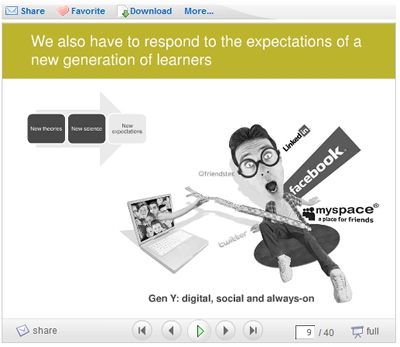
SlideShare presentation
A presentation on SlideShare.net

That concludes this practical guide.
A PDF version will be available for download soon.

Learning = adaptation

The new learning architectThroughout 2011 we will be publishing extracts from The New Learning Architect. We move on to the first part of chapter 3:
As human beings we must learn if we are to ensure our survival, to adapt to the ever-changing threats and opportunities with which we are confronted. As a result we are born as learning machines, capable of great achievements with or without the help of others.
Of course, we do start off with some basic, but still absolutely essential capabilities. At an instinctive, ‘visceral’ level, we are hard-wired to react positively to situations that, throughout our evolutionary history, have provided us with the promise of food, warmth or protection. Similarly, we are predisposed to respond negatively to those situations which have historically represented danger. These responses, positive or negative, are emotional ones, alerting the rest of the brain and sending signals to the muscles.
Beyond this rather primitive level, the brain is also capable of acquiring and then applying all sorts of skills and behaviours needed to function effectively in the world. Some of these are so important, they are set up in advance. As Norman describes : “The human brain comes ready for language: the architecture of the brain, the way the different components are structured and interact, constrains the very nature of language. Moreover the learning is automatic: we may have to go to school to learn to read and write, but not to listen and speak.”
Once these behaviours are firmly established through repetition, the brain is quite capable of carrying them out routinely without any conscious effort. There are literally thousands of things that all humans can do without trying, without giving a second thought; a state that some educationalists have referred to as ‘unconscious competence’.

Three levels of processing

According to Norman, Ortony and Russell, psychologists at Northwestern University, the brain operates at three levels. The first two, the visceral and the behavioural, are sub-conscious, as we have seen. The third is of a higher order. It allows us to reflect on our experiences and communicate these reflections to others. And because the lower level functions look after themselves, we can do all this while we carry out all sorts of everyday behaviours, the one sense in which we can genuinely multi-task.
Just as the behavioural level of the brain can enhance and inhibit our responses at the visceral level (so we don’t have to run and hide if we encounter a spider, and so we can develop a taste for bitter tasting food and drink if that’s what we like), the reflective level can enhance or inhibit our behaviours, so we can improve our performance or react to change. As an aside, the reflective level can also get in the way of performance, as tennis or golf players will attest when their inner voice berates them for their shortcomings and questions their ability to perform shots that have long since been assimilated into ‘muscle memory’. Timothy Gallwey  has done very well with his Inner Game books, persuading players to ignore their reflective minds and ‘just do it’.
Well life isn’t just a game of tennis (more’s the pity). We need our reflective minds to investigate, question, contemplate and generalise. That’s what makes us human. That’s how we grow and adapt. As Jay Cross  concludes, “Learning = adaptation. The strength of the human mind … is its ability to adapt to a change in circumstances. We call this learning.”
References:
Emotional Design by Donald A Norman, Basic Books, 2004
The Inner Game of Tennis by Timothy Gallwey, Jonathan Cape, 1975
Coming next in chapter 3: A little reflection does us good
Return to Chapter 1
Return to Chapter 2
Obtain your copy of The New Learning Architect

A practical guide to creating learning slide shows: part 3 – the narration

Practical guidesIn the first part of this practical guide, we discussed the potential of stand-alone slide presentations as a tool for learning. In the second installment, we looked at the visual element in the presentation – the slides. This time we look at the auditory component – the narration.

Packaging up a live presentation

The way you approach the narration will depend on whether you are (1) packaging up a presentation that you have previously delivered live, or (2) creating a stand-alone slide show from scratch. In the case of the former, the presentation will most likely represent you and your perspective on the topic in hand – you will want to record the voiceover yourself and retain as much of the personality of the original presentation as possible. That means keeping it natural and informal. Assuming you didn’t read from a script when you presented live (and let’s hope that’s the case), then you won’t want to read from a script now. Try to capture the buzz of the live presentation by imagining you are presenting to a live audience. Or why not record it live? You can always edit it down afterwards to remove any superfluous elements.

Public speaker
If you're packaging up a presentation you delivered live, you'll want to retain its personality.

Designing specifically for stand-alone use

On the other hand, you may be designing a slide show that will only ever be used as a piece of learning content. It is not intended as a personal statement and it won’t be attributed to you. In this case you are almost definitely best off writing a script and you should seriously consider using a professional voiceover artist to deliver this. Why? Because professional voiceover artists are very good at reading a script so it doesn’t sound like they’re reading a script. By and large, the rest of us aren’t.

Script for speaking

When scripting, it’s hard to avoid slipping into report writing mode. Keep reminding yourself that the words you are writing will be read aloud, not read from the screen. Try saying the words out loud yourself and keep revising them until you can put them across effortlessly.

Voiceover artist
Remember your script will be read aloud, not as a report.

Use a conversational tone

Whatever you do, avoid ‘corporate drone’. Write as you would speak. That means short sentences, simple language, the active voice (“The cat ate the mouse” not “The mouse was eaten by the cat”), and a free use of contractions (“I can’t remember …” not “I cannot remember …”). You can also help the voiceover artist by making absolutely clear (perhaps in bold type) which words need special emphasis.

Don’t duplicate your voiceover as on-screen text

Your learner’s brain can cope with one verbal channel (in this case the voiceover) but not two. If words are coming at you from two places at once, you’ll just overload. If absolutely necessary, emphasise key points and headings with on-screen text, but please don’t display your script verbatim.
Coming next: distribution

A parade of bandwagons

The new learning architectThroughout 2011 we will be publishing extracts from The New Learning Architect. We move on to the fifth and final part of chapter 2:
In finding ways to meet these new challenges and take advantage of new opportunities, it sometimes seems that l&d professionals are pushed from pillar to post. They are confronted by a dazzling and never-ending parade of bandwagons, each trumpeting their over-hyped claims and each damning their predecessors as out-dated and ineffective. Here are just a few of the unnecessary face-offs we’ve had to endure:
off-job v on-job learning
the classroom v e-learning
just-in-case v just-in-time learning
instruction v discovery learning
formal v informal learning
In each case, the implication is that there must be a winner and a loser; one is right and one is wrong. The falsity of this position is a fundamental cornerstone for this book. We don’t want to see any more babies (some of which to be honest are actually quite grown-up by now) thrown out with the proverbial bathwater. The 21st century l&d professional needs to be able to integrate all these possibilities, in the right proportions to meet their learning requirements, the needs of their audiences, within their particular constraints and taking advantage of their particular opportunities. They cannot achieve this if they are swinging wildly from one extreme position to another, trying one potential panacea for a little while and then moving on to another.
Training has for too long endured the unnecessary battle between the rationalists and the romantics, the ‘left brainers’ and the ‘right brainers’. Each camp is firmly entrenched in their positions, too busy ‘sneer leading’ to try and see the world from the perspective of their so-called enemy. Change will not be brought about by overcoming the enemy, nor by negotiating a ceasefire. It will come when we recognise those with differing views as the colleagues they undoubtedly are, doing their best just like you to make things work in difficult circumstances. Trainers shouldn’t just preach diversity, they should practise it too.
It’s time for some whole brain thinking. Less new-age voodoo. Less analysis paralysis. More learning and development.
Meanwhile, learners certainly have no doubt that changes are in the offing as the SkillSoft survey clearly demonstrates: “Traditional classroom training doesn’t have a large presence in the future according to those employees surveyed. Only 16.2% expected to be learning in a traditional classroom environment at an off-site location and only 33.4% expected classroom courses in the workplace to continue.”
But there is some scepticism that this change will be brought about by the old guard of the l&d profession, the dinosaurs. There are parallels in other fields, as Max Planck suggests, “An important scientific innovation rarely makes its way by gradually winning over and converting its opponents. It rarely happens that Saul becomes Paul. What does happen is its opponents gradually die out and the growing generation is familiarised with the idea from the beginning.”
I’m much more optimistic. It is natural for people – and that includes trainers, of any age – to resist change if this is thrust upon them. But they will engage wholeheartedly if they understand why change is necessary and if they are part of the solution. The alternative is not an attractive one, as Jack Welch points out: “When the rate of change outside exceeds the rate of change inside, the end is in sight.”
References:

The Future of Learning, SkillSoft, 2007.
Great Thoughts About Physics by Max Planck, 2006, quoted in Knowing Knowledge by George Siemens.
That concludes chapter 2. We move on to chapter 3: Part 1: Learning=Adaptation
Return to Chapter 1
Obtain your copy of The New Learning Architect