In part 1, we looked at the characteristics of online quizzes and explored how they could be used to assist or assess learning. In this instalment, we look at the various question formats and the types of learning for which they are suited.
Factual knowledge
In an adult learning context, factual information is usually supplemental to the core learning objective and more often than not just for general interest. However, some facts really do need to be known by heart: When was … ? What is … ? Who is … ?
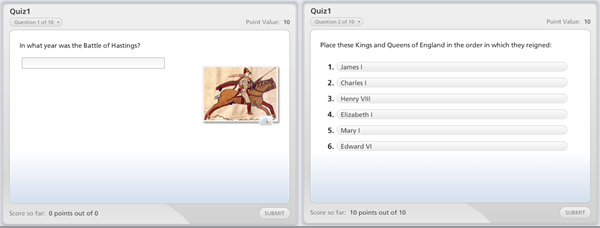
If it is essential that the learner can recall the information without prompting, then you have little choice than to ask a question that requires them to type the answer in. If it is only necessary that they are able to recognise the right answer, then various forms of multiple choice will do. In the example on the left, the learner is tested for recall of a date, which they must type in to the text box. The example on the right also checks for recall, in this case of a chronological sequence. Conceptual knowledge
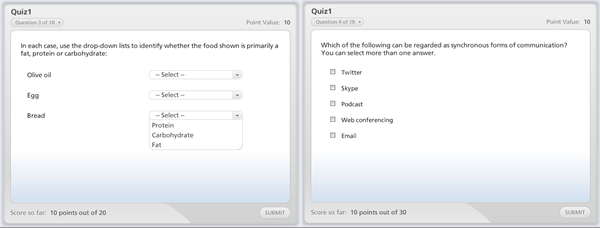
Concepts provide a common language for understanding a subject. Generally the aim is for the user to be able to identify the class or category to which given objects belong, whether these are tangible (like types of computer) or abstract (like schools of thought). The most common way of checking this knowledge is to provide the learner with examples and ask them to place these in the correct categories, as in the examples below: On the left is a typical matching exercise in which learners place example foods into categories. The alternative format on the right has learners select those examples which belong to a given category. Process knowledge
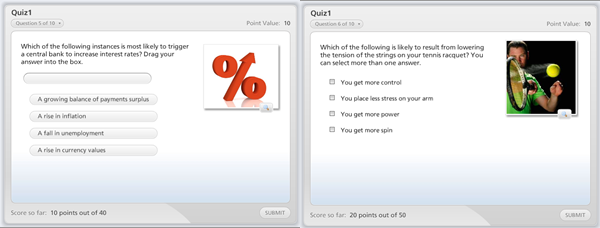
A process explains how something works as a chain of cause and effect relationships. To check understanding of a process, you can ask questions about causes or about effects, as shown below: In the left hand example the learner identifies a probable cause. On the right, the learner looks at possible effects.
Spatial knowledge
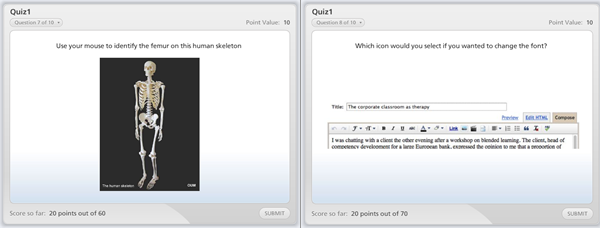
In this instance our aim is for the learner to be able to identify the locations of parts of an object, device, physical space or system. The easiest way to check this knowledge is with a question that has the learner click on a given part as shown below: The example on the left has the learner identify a particular bone on a picture of a skeleton. The task on the right is similar but in this case the object is a software interface. Procedural knowledge
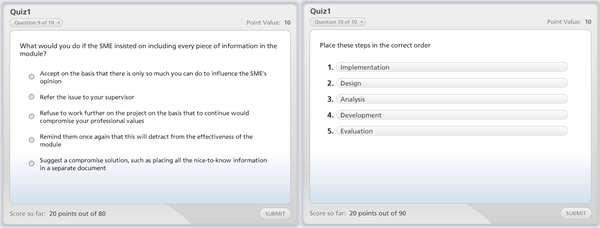
Procedural knowledge is tougher because in many cases what you really want to test is whether the learner can actually carry out the procedure rather than just answer questions about it. However procedural knowledge is a first step and you can use a variety of questions to check learning: Rules and principles determine how a procedure is implemented in specific cases. The example on the left explores how different principles could be applied to a particular situation. The example on the right checks that the learner knows the correct order in which procedural steps should be applied.
These examples were created in Articulate QuizMaker, although many quiz tools could do a similar job. In the next instalment we look at the principles underlying the writing of quiz questions.
Throughout 2011 we will be publishing extracts from The New Learning Architect. We move on to the second part of chapter 6:
Imagine a scenario in which no bottom-up learning took place, in which all learning was regulated and controlled by management, and in which the l&d department invariably took the lead. Here’s what might happen:
The l&d department knows exactly what knowledge and skills are required for each job position and are kept completely up-to-date about any changes to jobs and requirements.
Regular performance appraisals and other forms of assessment mean that line management are fully aware of any knowledge and skill gaps, and keep the l&d department fully informed about these.
The l&d department is resourced to provide solutions to meet all known knowledge and skills gaps, using carefully-planned, top-down interventions.
Employees do not need to worry about the knowledge and skills they need to meet current or future requirements because their employer is in complete command of the situation.
Sounds like it’s all under control. On the other hand, this might also be the outcome:
The information held by the l&d department regarding jobs and skills is too out-of-date to be of any use.
The l&d department does not have the resources to respond to anything except the most generic of needs.
When important changes are made to systems, processes and policies, the l&d department takes too long to develop top-down interventions to support the changes.
Knowledge requirements change so quickly that it is impossible for training programmes and job aids to be kept up-to-date.
There is such a diversity of jobs in the organisation that there is insufficient critical mass to justify the design and delivery of any formal interventions.
Expensive top-down interventions are delivered when employees are perfectly capable of meeting any needs for themselves informally.
While top-down learning is needed to control risk, bottom-up learning is needed to provide responsiveness. Few organisations have the luxury of being in complete control of all aspects of the training cycle – even if it was possible to attain this position, it would probably not be cost-effective. Bottom-up learning fills the gaps by providing a response to urgent situations and by meeting the needs of minorities. It’s quick, it’s flexible, it’s empowering. That’s why bottom-up learning plays a valuable role in any learning and development strategy.
Coming next in chapter 6: How much learning should be bottom-up?
Return to Chapter 1Chapter 2Chapter 3Chapter 4Chapter 5 Obtain your copy of The New Learning Architect
We all know what a quiz is. It’s a test of knowledge, typically accomplished by asking a series of questions.
Quizzes are popular in the digital environment, not least because computers find it so easy to deliver the questions and score the answers. In fact, if you were in your first week of a programming course, you’d probably have a go at putting together a multiple choice quiz. Quizzes are an entertaining diversion, particularly when delivered within the context of a game, with rules, levels, competition and prizes, but they can also play a useful role within a learning solution. A function that is often abused, perhaps, but the potential is there. TV quiz shows make for good popular entertainment and similar formats can be used within computer-based quizzes
Media elements
Although many quizzes are primarily textual, the possibility is there to use every media element. Images can provide the basis for questions that test for recognition of people, objects or places or to locate elements within interfaces and other spaces. Video can be used to portray situations that test the learner’s ability to make critical judgements. Audio can be employed to check for recognition of voices or pieces of music. A variety of media can also be used to introduce questions and provide feedback.
Interactive capability
Quizzes are essentially interactive. They serve their function in testing knowledge only by eliciting responses from learners. Just about any input device imaginable can be used as the basis for that interaction – key presses, mouse clicks, touches, the lot.
Applications
The most common application for a quiz is as a test of mastery. This is fine in principle as long as it really is possible for the knowledge and skills in question to be assessed by the sort of questions that a computer can deliver. To state the obvious, you might be able to check that a pilot understands the principles of aerodynamics using a quiz, but you can’t check they can fly the plane. Some caution also needs to be taken in terms of when a quiz is delivered. If the quiz comes right after the delivery of content (and the learner knows it’s coming), it is all too easy for the learner to hold on to enough of the information to get them through the quiz, but then forget it all the day after. We can probably all remember how possible it was to cram in information before an exam, only to see that evaporate almost as soon as we committed it to paper. A much more valid test of knowledge comes weeks, months or years after original exposure to the information. Tools like this low-cost Math Quiz Creator can be used not only for assessment, but to provide loads of valuable practice
Although their potential is rarely exploited to the full, quizzes can actually play a useful role at just about every stage in the learning process:
As a way, right up front, for the learner to find out how much they already know and how much they need to know. This sort of diagnostic pre-test not only demonstrates the need for learning, it helps to direct the learner to content that is likely to be most useful.
As a vehicle for delivering the learning content itself. One way to create an engaging lesson is to use a series of quiz questions to challenge and then build on the learner’s prior knowledge. Every question alerts the learner to a gap to fill and all you have to do is oblige.
As a means for repetitive drill and practice. Unlike teachers, computers never get bored asking questions and they don’t lose their patience when the learner takes a little longer than expected to get the point. In the classroom, most knowledge is under-rehearsed and most skills under-practised. Quizzes represent a good way to remedy that.
So how do I get started?
There is no shortage of tools for creating quizzes. Most cover the usual range of questions types – multi-choice, multi-answer, free text response, sequencing, matching, selecting hotspots and all sorts of variations. All e-learning authoring tools come with a quiz making capability, plus there are specialist stand-alone tools, including ones that you can use for high-stakes assessments or for quiz games. You will find a quiz-building capability in just about any authoring tool, including this one which forms part of Articulate Studio
In practice, it’s likely that tools will be the least of your problems. Writing the questions is a much more challenging task, and that’s where we’ll be directing our attention next. Coming in part 2: using the correct question for the job
Throughout 2011 we will be publishing extracts from The New Learning Architect. We move on to the first part of chapter 6:
Bottom-up learning occurs because employees want to be able to perform effectively in their jobs. The exact motivation may vary, from achieving job security to earning more money, gaining recognition or obtaining personal fulfilment, but the route to all these is performing well on the job, and employees know as well as their employers that this depends – to some extent at least – on their acquiring the appropriate knowledge and skills.
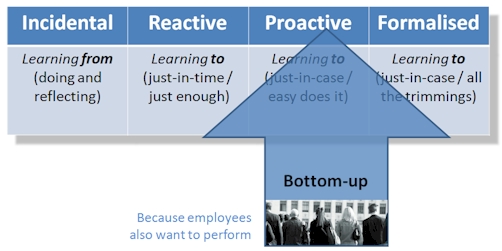
Bottom-up learning occurs in each of the four contexts that we have described previously: Experiential: Experiential learning is essentially reflective – ‘learning from’ rather than ‘learning to’. This process can be initiated by the individual without any deliberate action on the behalf of the employer. At its simplest, this might mean no more than sitting back and thinking over events that have occurred, whether these events directly involved the individual or whether they were merely observed. If an event had a negative outcome, the question needs to be asked ‘why did this happen?’ Could the outcome be avoided in future or mitigated in some way. If the outcome was positive, it is just as important to know why. Why can be done to replicate this successful outcome, or to exploit it if it occurs again? The process of reflection becomes interactive when it takes the form of a discussion – talking things over. And it becomes more disciplined when it is made explicit through blogging. Employees can also choose to expand the opportunities they have for learning experiences by ensuring they maintain a healthy work-life balance. Out-of-work activities such as hobbies, travel and voluntary work will often have parallels at work. By maximising the scope for new sensory input, individuals increase the chance that they’ll build valuable skills and insights that they can apply in their jobs. On-demand: When it comes to just-in-time learning, employees have always needed to rely to some extent on their own endeavours. It is highly unlikely that any employer will be able to predict every item of information that every employee is going to need in every situation, and make that available in the form of some sort of job aid or resource. At simplest, when they’re stuck, employees simply consult an expert, typically the person sitting next to them. Ideally this process will be formalised through some kind of online ‘find an expert’ solution, a sort of corporate Yellow Pages. Increasingly online tools are being made available to support and encourage bottom-up learning at the point of need, notably forums to which questions can be posted, and wikis which can be used to collect together useful reference information. Non-formal: There’s a number of ways in which employees can set about equipping themselves with the knowledge and skills they need to develop in their roles, without enrolling on formal courses. While each of these methods relies on the employee to initiate the activity, they all tend to require some help from the employer, whether that’s by establishing the appropriate infrastructure or by committing to policies which make opportunities accessible. Some examples include open learning, where the employee takes advantage of learning resources, such as short self-study courses, which the employer makes available for access on demand; social networking software, which allows the learner to establish contacts with others within the organisation who have similar needs; attending external conferences; and enjoying the services provided by professional associations and other external membership bodies. Formal: You would think that formal courses were an exclusively top-down initiative, but there are plenty of ways in which employees can take the initiative themselves. Perhaps the most obvious examples are postgraduate courses, such as Masters Degrees, and qualifications offered by professional bodies. There are, of course, other less formidable options, such as adult education courses offered by local colleges.
People have many and wide-ranging needs, whether that’s at the level of survival (security, shelter, food, reproduction, etc.), needs of a more social nature (belonging, friendship, recognition) or of a higher order (stimulation, advancement, personal fulfilment, etc.). Directly or indirectly, learning can help an individual to meet many of these needs. To the extent that this learning is reflected in better performance at work, then the organisation has as much to gain as the individual.
While the l&d professional may not determine the ‘content’ of the learning that takes place on a bottom-up basis, they certainly have a role to play in determining the ‘process’. Because it is impractical to meet all learning requirements top-down, it is in the interests of the organisation to encourage relevant, work-related, bottom-up learning. Some of this will happen anyway, regardless of what the l&d department puts in place, but much depends on the right policies and infrastructure being put in place.
Where l&d professionals must be careful, is not being over-prescriptive about the ways in which bottom-up learning occurs. As John Seely Brown and Paul Duquid point out : “The solution to unpredictable demand is systems that are geared to respond to pull from the market and from audiences; built on loosely-coupled modules rather than tightly integrated programmes; people-centric rather than resource or information-centric. There needs to be a willingness to let solutions emerge organically rather than trying to engineer them in advance.” Reference: The Social Life of Information by John Seely Brown and Paul Duquid, Harvard Business School Press, 2002.
Coming next in chapter 6: Why bottom-up learning is needed
Return to Chapter 1Chapter 2Chapter 3Chapter 4Chapter 5 Obtain your copy of The New Learning Architect
Throughout 2011 we will be publishing extracts from The New Learning Architect. We move on to the sixth and final part of chapter 5:
To summarise, these are the conditions for success with top-down learning:
Top-down learning interventions are aligned with the business goals of the organisation and measured in terms of the contribution they make to these goals.
These interventions are designed to meet genuine learning and development needs.
These interventions are focused on critical and widely used knowledge and skills, and on the needs of novices and those with low metacognitive skills.
The most resources are allocated to the interventions that deliver the most value to the organisation.
Senior management is actively involved in determining needs and genuinely committed to helping make learning interventions a success.
All key stakeholders, including potential learners, are involved in the process of designing and developing the interventions.
All four contexts (experiential, on-demand, non-formal, formal) are considered in designing the most appropriate form for the interventions.
In part 1 of this Practical Guide, we examined the history, characteristics and benefits of the digital learning tutorial. In the second part, we explored some strategies you can use to design tutorials that impart important knowledge. In this third and final part, we look at how tutorials can be used to teach procedures.
Engage the learner
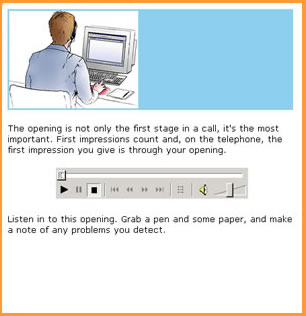
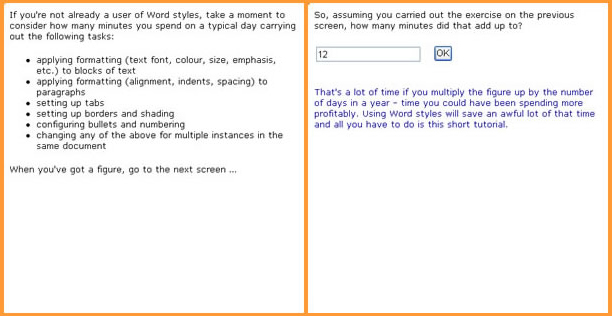
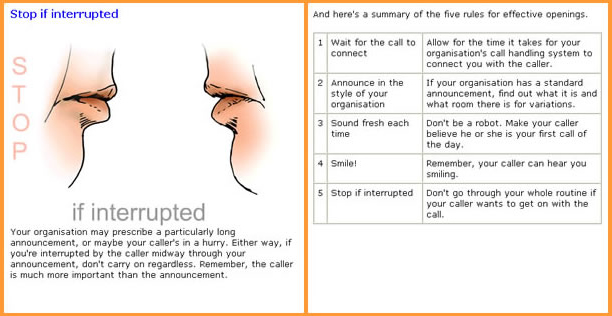
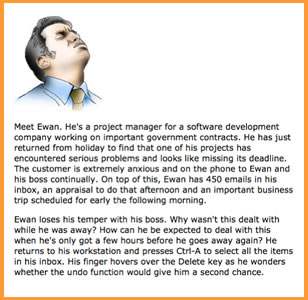
As we discussed in the previous part of this guide, you cannot simply assume that the learner will come to your tutorial full of enthusiasm for the topic. Your task is to convey the importance of the topic and its relevance to the learner’s job. The simplest way to do this is just to explain, but you can achieve a more powerful effect through some form of introductory activity. This activity opens a tutorial on greeting a customer on the telephone. It demonstrates why the opening is so important. This activity, in a module that teaches how to use styles in Microsoft Word, aims to establish relevance of the topic. The next step in the module is to demonstrate just how much time can be saved by using Word styles. Explain and demonstrate
Your next step is to provide a quick overview of the steps in the procedure. It will help the learner if you present the big picture before going into detail.
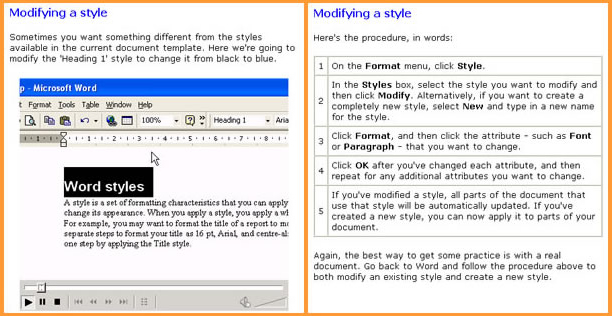
Then explain or demonstrate the procedure step-by-step, explaining any special rules that need to be followed at each step. Here the five steps in the procedure are presented one at a time using simple animations and text. This is followed by a simple tabular summary, which could also serve as a job aid. In this example, screencasts are used to present each step. Again, the key points are also summarised in simple tablular form.
Provide an opportunity for safe practice
It’s one thing to understand a procedure. It’s quite another to be able to put it into practice. It takes time to turn knowledge into skill and it’s unlikely that your tutorial will do much more than kick-start this process. It’s your job to provide the learner with the opportunity to take their first step, with a simple yet challenging activity which mirrors the real world as closely as possible.
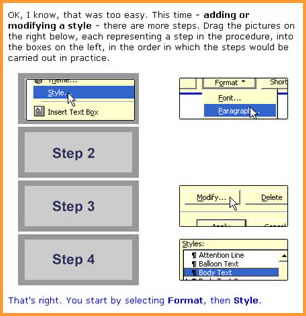
With a complex procedure, you may want to provide a practice activity at each step. In this case, it’s likely that you’ll cover each step in a separate tutorial. Don’t forget to bring the whole procedure together at the end, as in real life steps are not carried out in isolation. This drag and drop activity requires the learner to place the steps in the procedure into sequence. This is still not checking for the ability to apply the skill, so another activity will be needed which has the learner carry out a task using this knowledge.
One of the ways that you can provide practice opportunities is using learning scenarios. For more information, see Onlignment’s Practical guide to creating learning scenarios.
Point to the next step
A how-to tutorial is the first step in learning a new skill. In many cases the learner will be able to take things on from there on their own, but where the skills require a great deal more safe practice before they are applied on-the-job, you may find you have to organise further practice opportunities using simulations, role plays and workshop activities.
That concludes this Practical Guide. It is now also available as a PDF download.
Next up: A practical guide to creating quizzes.
Throughout 2011 we will be publishing extracts from The New Learning Architect. We move on to the fifth part of chapter 5:
Having determined where the priorities lie for top-down learning interventions, attention inevitably turns to the forms that these interventions should take and the ways in which they can be most successfully delivered. All too often, l&d professionals (often on the insistence of their sponsors in the line) start with the assumption that some sort of formalised course is required, whether classroom, online or a blend. But as we have seen, there are four contexts in which top-down learning could occur. Who is to say that an action learning programme, a performance support system or a programme of coaching would not do the job better or more efficiently?
The chances that an intervention will be successful are influenced by the involvement of key stakeholders in the process of design, development and implementation, as Wick, Pollock, Jefferson and Flanagan report : “We continue to be surprised by the number of major programmes, in otherwise well-managed companies, that are developed entirely within the human resource or training organisation and go forward with little or no input from line leaders. Their perspective on the business is different from that of line leaders; they have less hands-on experience managing hard business metrics. If they consult only among themselves, they may design a programme with strong learning objectives but only weak links to key business measures.”
There is another strong reason for involving those who will be affected by the intervention and that is to gain their commitment. Learning is change. At the personal level, this is true because learning changes the brain – if it doesn’t, no learning has taken place. At an organisational level, it is true because learning changes the way we behave and consequently how the organisation performs. As we have already discussed, people don’t automatically resist change; in fact we voluntarily undertake substantial and disruptive changes in our own lives. As Peter de Jager explains, “We don’t resist change, we resist being changed.” At very least, those being asked to change should be told why. Better still, they should participate in determining how. Establishing the chain of evidence
The process is not complete, as we are constantly reminded, until we have evaluated the results. First of all it’s important that we know what the reactions of learners has been to our efforts – not because this is the key indicator of success, but because this feedback enables us to continuously improve what we deliver. We do need to know whether the intervention has resulted in the desired change in knowledge and skills and whether that change has manifested itself in the way that learners behave on the job. But most importantly, we need to know whether the organisation is receiving any tangible benefit from these changes. Kirkpatrick calls this a ‘return on expectations (ROE)’. What did the organisation expect when they sanctioned this intervention? Have these expectations been met? It is not necessary to provide incontrovertible proof, based on controlled scientific studies. It is necessary, however, to be able to provide a chain of evidence: we know the intervention was well-received and that participants learned what we wanted them to learn; we know they applied this back on the job and we have seen an improvement in those areas of the business that we were looking to address. That’s as much proof as most managers will ever require.
On the other hand, evaluation studies don’t always capture the true value of learning interventions. As Stephen Downes reminds us: “Measuring learning is still like measuring friendship. You can count friends, or you can count on friends, but not, it seems, both.”
Coming next, the sixth part of chapter 5: Conditions for success
Return to Chapter 1Chapter 2Chapter 3Chapter 4 Obtain your copy of The New Learning Architect
In part 1 of this Practical Guide, we examined the history, characteristics and benefits of the digital learning tutorial. In this second part, we uncover some strategies you can use to design tutorials that impart important knowledge.
Engage the learner
You cannot take for granted that the learner is interested in the information you want to convey. You have no automatic right to their attention. Your first task is to engage the learner in the tutorial by persuading them that the subject in question matters to them – not to people in general, but them.
You may be pretty sure that your learners will come to your tutorial motivated, but even then it makes sense to explain why the topic is relevant to their work and how they stand to benefit by sticking with you until the end. This opening screen is designed to engage the learner with the topic - in this case managing stress at work
In other cases you may need to make a greater effort, to somehow demonstrate the importance of the topic. This can be achieved through a simple but credible example – a case study, a scenario, a ‘war story’ if you like, ideally one with which the learner can easily identify. The storyline should demonstrate what the negative consequences might be if the learner was to remain in ignorance of the important information you have to offer. If you can’t come up with a plausible storyline, ask yourself whether you really do have a learning need.
Explore the learning content
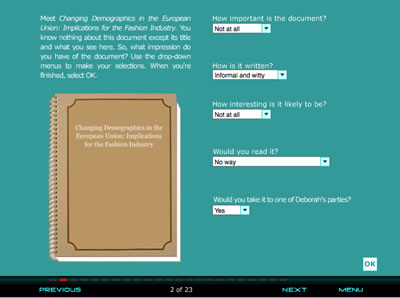
Learning happens as learners make connections and detect patterns. So all learning is actually built on previous learning – it cannot occur in isolation. For this reason, just about every learner will benefit from relevant examples, analogies and metaphors. They might also surprise you by having some or all of the required knowledge already. Some of the most successful knowledge tutorials start by checking what the learner already knows and then working to fill in the gaps. These interactions build on what the learner already knows rather than assuming they are complete novices
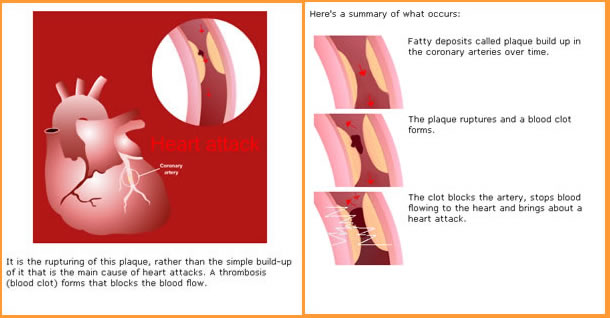
Sooner or later you will want to present what needs to be known, as clearly and succinctly as possible, making good use of visuals to clarify your points and improve retention. If you have some ‘must knows’ as well as ‘nice to knows’, then make absolutely clear what these are – don’t expect learners to work this out for themselves. Even better, move the ‘nice to knows’ to a separate resource which the learner can access later. In this example, the learning content is explained diagramatically, using an animation, as well as in a simple, tabular form
Abstractions are not enough, so don’t hold back – present as many examples as you can. If you’re not sure how many examples to provide, simply ask the learner: “Would you like another example?”
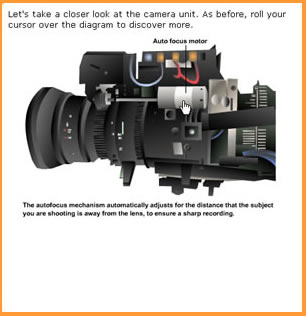
Depending on the type of knowledge, you might want to provide the opportunity for the learner to actively explore the topic in more detail. This particularly makes sense when you are explaining how something works or familiarising the learner with the layout of a physical space, an object or an interface. This screen allows the learner to explore a piece of equipment by rolling their cursor over parts of the picture.
Put the learning to work
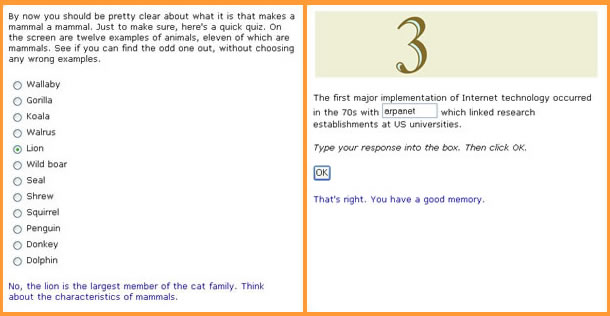
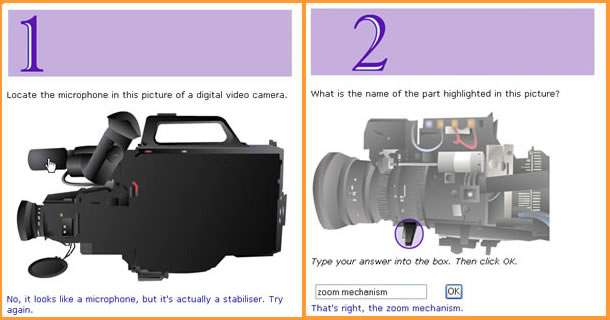
The learner is much more likely to retain and recall important information if they are provided with plenty of opportunities to work with it, and in the context of a tutorial that’s likely to mean answering questions. These serve not only to reinforce the learning but also to help you identify gaps which need to be filled. The easiest way for you to fill the gaps is through the feedback you provide to the questions. Although many rapid authoring tools do not make this easy to accomplish, it helps if you can provide different feedback for every answer that the learner can make. Use the feedback to correct any mistakes, not necessarily by repeating the same information from earlier in the tutorial but with a new form of words, perhaps a new example or a new memory aid. The example on the left tests for understanding of a concept. The one on the right tests for factual knowledge. These two examples test for knowledge of the location of a part of a piece of equipment and for the name of a part at a specific location.
You cannot be sure you have achieved your objectives for the tutorial just by asking a few questions and giving feedback. If the learner struggled with the first questions then you should ask some more to make sure the feedback has worked. If in doubt, you could always ask the learner if they want to try more questions. To be honest, most tutorials do not go this trouble, but then most tutorials are a little hit and miss.
Point to the next step
A knowledge tutorial is a catalyst. If you do our job well, you will have excited the learner’s interest in the topic and provided them with a foundation on which to build. Unfortunately, new knowledge cannot be cemented in a single session. Your key learning points will need to be reinforced often before they really stick.
So, finish the tutorial by pointing the learner to the next step, whether this is a further tutorial, web sites that they can explore, a discussion forum or all manner of other resources. Coming next:Creating how-to tutorials
Throughout 2011 we will be publishing extracts from The New Learning Architect. We move on to the fourth part of chapter 5:
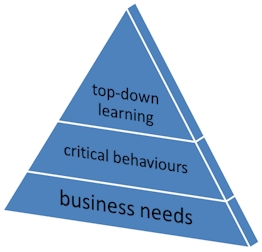
As we’ve seen, given that all l&d professionals operate within a context of limited resources, top-down learning needs to be well targeted. Determining what those targets should be is not a trivial task, particularly as many l&d departments are not that well connected to the managerial decision-making process within their organisations. The effort must be made, however, or else a high proportion of the resources expended in top-down interventions (not least the efforts and talents of committed l&d professionals) will be misdirected, if not completely wasted. As Berry Gordy, founder of Motown Records, famously remarked: “People ask me, ‘where did I go wrong?’ My answer is always the same: Probably at the beginning.” Top-down learning should be targeted at behaviours that are critical to the organisation. Critical behaviours can only be determined by looking at business needs.
It is nothing new to be told that training should be aligned to the needs of the business, but that doesn’t mean that it ‘goes without saying’ or is ‘common sense’. All too often, common sense is anything but common. Ask yourself how many of the training interventions in your organisation are clearly aligned to current business needs, rather than fulfilling requirements articulated sometime in the distant past, but which have no current relevance. And how many interventions have originated from the l&d department on the basis of where they believe the organisation should be heading, regardless of the views of senior management? No organisation ever set up an l&d department so this department could then determine the appropriate direction for the organisation. It is not up to l&d professionals to decide what is good leadership, what is good customer service or what are appropriate values for the organisation. Their job is to help senior management make their vision a reality, regardless of whether that vision is shared by the professionals that staff the l&d department.
A good question to ask is this: What behaviours are critical to the future success of this organisation?
Let’s unpick this a little. You need to know about ‘behaviours’ because, of all the various factors which influence the success of an organisation, only these can be affected by learning and development. You need to find out which are the ‘critical’ behaviours, because you don’t have the resources to devote to the non-critical. And you need to focus on ‘future success’, because learning and development is an investment in the future and can do little to influence what happens right now. The only people who can answer this question with any authority are senior management.
The question can and should also be addressed at each of the main functional and regional departments and divisions within the organisation, as well as at various levels. For example: “What behaviours are critical to the future success of the IT department or European region”; “What middle management behaviours are critical to the future success of the organisation?”
Once you know what behaviours are required if the organisation is to succeed in the future, you need to assess the extent of the task in front of you: To what degree are employees already exhibiting the behaviours that are critical for success?
Answering this question is no small task. If you work for a larger organisation, then ideally you’ll have set up a performance management system which enables you to keep track of how individuals are performing. This will include a competency framework covering every job position; one that is up-to-date with the constant and inevitable changes in job responsibilities and which describes the behaviours that senior management are looking to encourage. In order for you to assess the extent to which these competences are evidenced in actual performance, all employees will have been regularly assessed against this framework or will have conducted some form of self-assessment. Smaller organisations may not have gone so far, but they should at very least be conducting regular performance appraisals.
If, having carried out your research, you find no gaps, then your only problem is ensuring the continued supply of employees who exhibit the desired behaviours. You should be so lucky! Chances are you’ll have to ask one more question: What influence can learning and development have on these behaviours?
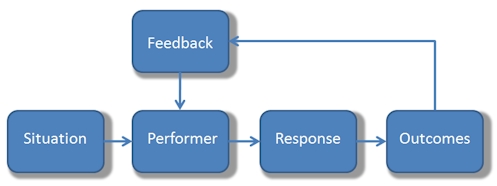
Performance is influenced by a lot more than skill and knowledge, as this diagram shows:
Situational influences on the performer include the clarity of roles and objectives, the suitability of the working environment, and the tools and other resources at the performer’s disposal. The performer him or herself has aptitudes (indicating his or her potential to learn) and motivations, as well as their accumulated knowledge and skills. The performer’s responses are also influenced by outcomes (the incentives and disincentives that are likely to result from performing in a certain way) as well as the timely availability of relevant feedback. The whole performance system has to be functioning correctly if performers are to exhibit the desired behaviours. Learning and development is only going to work if (1) unsatisfactory performance can at least partly be attributed to a lack of knowledge or skills, and (2) the employees in question have the aptitude to acquire these.
According to Stolovitch & Keeps , “The leading human performance authorities have all demonstrated that most performance deficiencies in the workplace are not a result of skill and knowledge gaps. Far more frequently they are due to environmental factors, such as a lack of clear expectations; insufficient and untimely feedback; lack of access to required information; inadequate tools, resources and procedures; inappropriate and even counterproductive incentives; task interference and administrative obstacles that prevent them achieving desired results.”
L&d professionals may have to be assertive in conducting and communicating this sort of logical analysis. As Wick, Pollock, Jefferson and Flanagan remind us, “The problem typically begins when someone in upper management decrees that the company needs to have a programme on some particular topic. And when the goal of having a programme is defined as ‘having a programme’, the initiative is in trouble from the start.” Senior managers may be experts in determining the problems that are getting in the way of performance, but they are not experts in finding the solutions – that’s your job, and this is your time to speak up.
Coming next, the fifth part of chapter 5: Implementing top-down learning interventions
Return to Chapter 1Chapter 2Chapter 3Chapter 4 Obtain your copy of The New Learning Architect
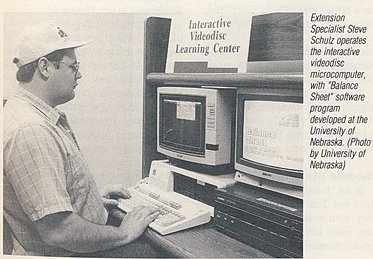
The digital learning tutorial is anything but a new concept. Almost as soon as computers became generally available, efforts were made to automate the process of teaching through the medium of self-study lessons. Under the guise of CBT (computer-based training), interactive video or e-learning, and on a variety of platforms from green-screen mainframe terminals to the early microcomputers, using videodiscs, CD-ROMs, web resources or smart phone apps, the format stays pretty constant – a carefully-crafted sequence of screens displaying learning material and providing opportunities for interaction. The digital learning tutorial is not a new concept
Strange as it may seem, as a result of this long history, instructional designers (those who design these tutorials) are as much a part of the training establishment as those who’ve spent much of their lives in the physical classroom. A handful have been at this task for 30 years or more and they have learned a thing or two along the way. In this practical guide, we’ll attempt to pass on some of the wisdom that has been passed down about the design of learning tutorials, while acknowledging that change is occurring very fast in learning and development and that, as a result, what worked in 1981 when the IBM PC was first launched may not be quite so appropriate in 2011. The traditional tutorial is free-flowing and interactive - its digital equivalent should be no different
So what is a tutorial? The Concise Oxford Dictionary defines a tutorial as “a period of teaching or instruction given by a tutor to an individual or small group.” This hardly sounds like an efficient way of bringing about learning; indeed, only a select group of universities are still prepared to go to this much trouble for their students, and trainers are no different. Luckily, the same dictionary provides another definition: “A tutorial is an account or explanation of a topic, printed or on-screen, intended for private study.” This is nearer to what we’re looking for, but with some of the interactivity, perhaps, that we might find in the face-to-face tutorial.
Media elements
A digital learning tutorial can and frequently does utilise every available media element. Verbal material can be provided in textual form or as audio. Visual material can range from simple photos, illustrations and diagrams through to animations, 3D environments and video. The perfect combination is one that communicates the learning material clearly to the intended audience, while working within the constraints of the available technical infrastructure.
Interactive capability
A tutorial is essentially interactive. Screencasts, slide shows, podcasts, videos and all manner of other digital resources can be used effectively without any built-in interaction. Not so a tutorial. Here interaction is the key to what is typically intended as a completely self-contained learning experience. An exposition of learning content followed by a quiz does not constitute a tutorial. To be effective, interaction needs to be integrated into every step of the learning process. Interaction is integral to the tutorial
Applications
A digital learning tutorial is an instructional device. Instruction is guided by clear objectives. It uses appropriate strategies to support learners as they progress towards these objectives. It is responsive to the difficulties learners may experience along the way. It finishes when the job is done, not when time is up or when all the slides have been shown.
Instruction is particularly valuable when your goal is to provide essential knowledge or to teach rule-based tasks. Designed well, it is capable of providing consistent, measurable results. While those with higher levels of expertise in the topic might find this process laboured, even patronising, novices will be thankful for the structure and support.
So how do I get started?
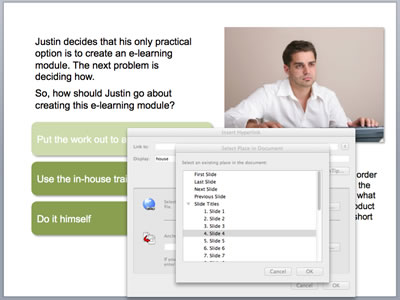
It is possible to create learning tutorials with a general purpose tool like PowerPoint, but you will be severely limited in what you can achieve interactively (you can branch between slides using hyperlinks, but this is a fiddly method to use for anything other than the simplest interactions) and you will not have the functionality necessary to track progress in a learning management system. You can create interactions in PowerPoint using hyperlinks between slides but this is a laborious process and you are limited in what you can achieve
The same applies if you use a standard web development tool like Dreamweaver (although, to be fair, Adobe do provide the additional functionality required for building tutorials in a special version of Dreamweaver available as part of their eLearning Suite).
Most people prefer to use a tool that is specially designed to support the development of e-learning. These come in desktop form (Articulate, Captivate, Lectora and many others) and also as online tools available through your web browser. You’ll be looking for a tool that’s easy to use but that is also capable of delivering the level of interactivity that you require.
Much more important than the tool is what you do with it, and that’s what we’re moving on to next. Coming in part 2: Creating knowledge tutorials

 In part 1, we looked at the characteristics of online quizzes and explored how they could be used to assist or assess learning. In this instalment, we look at the various question formats and the types of learning for which they are suited.